• Thế Giới Giải Mã

    Bí ẩn nhân loại Leonardo Da Vinci

  • Thế Giới Giải Mã

    Anh hùng thầm lặng Nikola Tesla

  • Thế Giới Giải Mã

    Thần đèn Thomas Edison

  • Thế Giới Giải Mã

    Người thôi miên Adolf Hitler

Showing posts with label JavaScript. Show all posts

12 July 2023

Session và Cookie ?


Session và Cookie là hai khái niệm quan trọng trong lập trình web để lưu trữ thông tin và duy trì trạng thái của người dùng trên trang web. 


Session (Phiên làm việc) là một cơ chế lưu trữ thông tin trên máy chủ. Khi một người dùng truy cập vào trang web, máy chủ sẽ tạo ra một phiên làm việc duy nhất và gán một ID phiên cho người dùng đó. Thông tin của người dùng, như tên, địa chỉ, giỏ hàng, sẽ được lưu trữ trong phiên làm việc này. Phiên làm việc thường được lưu trữ trên máy chủ và chỉ có thể truy cập thông qua ID phiên. Khi người dùng đăng xuất hoặc đóng trình duyệt, phiên làm việc sẽ bị hủy và thông tin của người dùng sẽ bị xóa. 


Cookie (Bánh quy) là một tệp nhỏ chứa thông tin được lưu trữ trên máy tính của người dùng. Khi người dùng truy cập vào một trang web, máy chủ có thể gửi một hoặc nhiều cookie đến trình duyệt của người dùng. Cookie chứa thông tin như tên người dùng, tuổi, sở thích, v.v. Trình duyệt sẽ lưu trữ cookie này và gửi nó lại cho máy chủ mỗi khi người dùng truy cập vào trang web đó. Cookie thường được sử dụng để duy trì trạng thái đăng nhập, theo dõi hoạt động của người dùng và cung cấp trải nghiệm cá nhân hóa trên trang web. 


Tóm lại, Session được lưu trữ trên máy chủ và Cookie được lưu trữ trên máy tính của người dùng. Cả hai đều giúp duy trì trạng thái và lưu trữ thông tin của người dùng trên trang web.

Sự khác nhau giữa function declaration và expression trong Javascript


Trong JavaScript, có hai cách khai báo hàm là function declaration (khai báo hàm) và function expression (biểu thức hàm). Dưới đây là sự khác nhau giữa hai cách này: 


1. Function Declaration (Khai báo hàm): 

   - Cú pháp: function functionName() { } 

   - Được khai báo trên cùng của phạm vi (hoisting), tức là bạn có thể gọi hàm trước khi khai báo nó trong mã. 

   - Có thể gọi hàm từ bất kỳ đâu trong phạm vi hiện tại. 

   - Thường được sử dụng cho các hàm lớn, phức tạp. 


Ví dụ:

function myFunction() {
  console.log('Hello!');
};
myFunction(); // Output: Hello!


2. Function Expression (Biểu thức hàm): 

   - Cú pháp: var functionName = function() { } 

   - Khai báo hàm bằng gán giá trị cho một biến. 

   - Không được hoisting, nghĩa là bạn chỉ có thể gọi hàm sau khi nó được khai báo trong mã. 

   - Phạm vi của hàm được giới hạn bởi phạm vi của biến mà nó được gán vào. 

   - Thường được sử dụng cho các hàm nhỏ, đơn giản hoặc trong các biểu thức khác. 


Ví dụ:

var myFunction = function() {
  console.log('Hello!');
};
myFunction(); // Output: Hello!

Tóm lại, function declaration và function expression đều cho phép bạn khai báo và sử dụng hàm trong JavaScript. Việc sử dụng loại nào phụ thuộc vào ngữ cảnh và yêu cầu của mã của bạn.

JS runtime cách xử lý bất đồng bộ và đồng bộ


JS runtime (thời gian chạy của JavaScript) xử lý bất đồng bộ (asynchronous) và đồng bộ (synchronous) theo cách khác nhau.


Khi JavaScript chạy trên trình duyệt, runtime sử dụng mô hình sự kiện (event-driven) để xử lý các sự kiện và tương tác người dùng. Khi có một sự kiện xảy ra, runtime sẽ đưa sự kiện đó vào hàng đợi sự kiện (event queue) và tiếp tục thực hiện các công việc khác. Khi runtime hoàn thành các công việc hiện tại, nó sẽ lấy sự kiện đầu tiên từ hàng đợi sự kiện và xử lý nó.


Đối với các tác vụ bất đồng bộ như gọi API, tải tệp tin, hoặc thực hiện các tác vụ mạng, JavaScript sử dụng các hàm bất đồng bộ như setTimeout, setInterval, fetch, XMLHttpRequest, hoặc Promise

. Khi gọi các hàm bất đồng bộ này, runtime sẽ không chờ đợi kết quả trả về mà tiếp tục thực hiện các công việc khác. Khi kết quả trả về, runtime sẽ đưa nó vào hàng đợi sự kiện và xử lý sau.


Đối với các tác vụ đồng bộ, JavaScript sử dụng cơ chế gọi lại (callback) hoặc 

async/await

 để xử lý. Khi gọi một hàm đồng bộ, runtime sẽ chờ đợi hàm đó hoàn thành trước khi tiếp tục thực hiện các công việc khác. Điều này có thể gây trì hoãn (blocking) trong quá trình thực thi.


Tuy nhiên, để tránh trì hoãn quá lâu và đảm bảo ứng dụng vẫn phản hồi, JavaScript runtime sử dụng mô hình bất đồng bộ và sự kiện để xử lý các tác vụ dài hạn. Bằng cách này, runtime có thể tiếp tục thực hiện các công việc khác trong khi đợi kết quả trả về từ các tác vụ bất đồng bộ.

06 July 2023

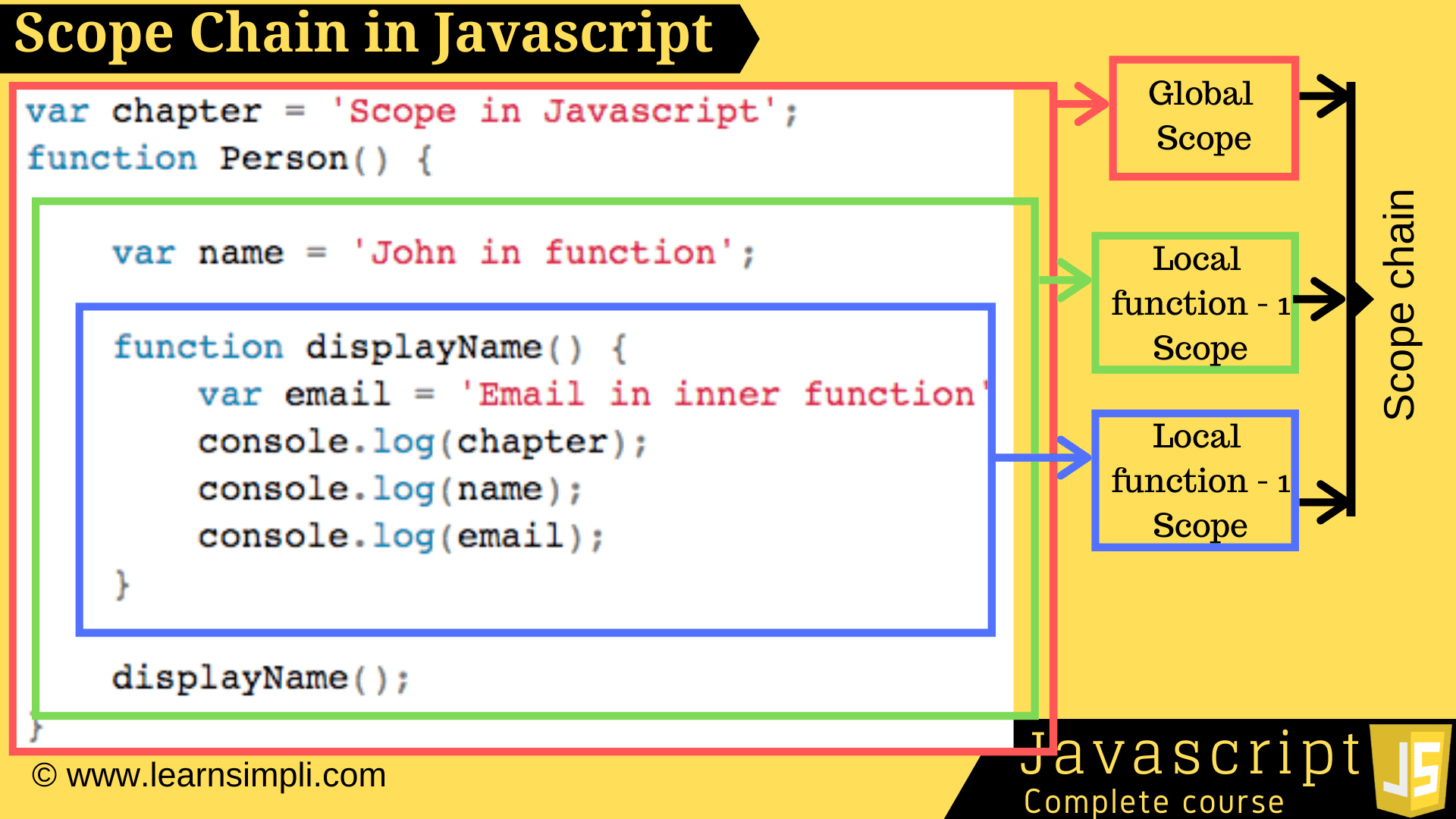
Có bao nhiêu Scopes trong Javascript

Scope Levels

1 - Global Scope
2 - Module Scope
3 - Block Scope
4 - Function Scope


Global Scope

<script src="script.js"></script>

<script>
  // script.js
  const a = 1
  console.log(a)
  // Prints: 1
</script>

<script src="script-1.js"></script>
<script src="script-2.js"></script>

<script>
  // script-1.js

  const a = 1
  // script-2.js

  console.log(a)
  // Prints: 1
</script>

Module Scope

<script src="script-1.js" type="module"></script>
<script src="script-2.js" type="module"></script>

<script>
  // script-1.js

  const a = 1
  console.log(a)
  // Prints: 1

  // script-2.js

  console.log(a)
  // Throws Uncaught Reference Error: a is not defined
</script>

Block Scope

function test() {
  const funcVar = "Func"

  if (true) {
    const ifVar = "If"
    console.log(funcVar, ifVar)
    // Prints: "Func", "If"
  }

  console.log(funVar, ifVar)
  // Throws Uncaught Reference Error: ifVar is not defined
}

{
  const a = 10
}

console.log(a)
// Throws Uncaught Reference Error: a is not defined

Function Scope

function test() {
  var funcVar = "Func"

  if (true) {
    var ifVar = "If"
    console.log(funcVar, ifVar)
    // Prints: "Func", "If"
  }

  console.log(funVar, ifVar)
  // Prints: "Func", "If"
}

23 June 2023

Non-blocking và Blocking

Non-blockingblocking là hai khái niệm quan trọng trong lập trình hướng đồng bộ.


Non-blocking là một thuật ngữ được sử dụng để chỉ việc thực hiện một tác vụ mà không cần chờ đợi kết quả từ tác vụ đó. Trong một non-blocking hàm, chương trình sẽ tiếp tục thực hiện các tác vụ khác mà không bị gián đoạn, cho phép chương trình tiếp tục thực hiện các tác vụ khác mà không cần chờ đợi kết quả từ tác vụ đó. Khi tác vụ đã hoàn thành, chương trình sẽ thông báo cho chương trình gọi nó về.


Ví dụ, trong một hệ thống đặt hàng, khi khách hàng đặt hàng, hệ thống sẽ gửi yêu cầu đặt hàng đến cửa hàng để xác nhận. Trong trường hợp này, hệ thống sẽ chạy một non-blocking hàm để gửi yêu cầu đặt hàng đến cửa hàng và tiếp tục thực hiện các tác vụ khác mà không bị gián đoạn. Khi yêu cầu đặt hàng được xác nhận, hệ thống sẽ thông báo cho khách hàng về kết quả của yêu cầu đặt hàng.


Blocking là một thuật ngữ được sử dụng để chỉ việc thực hiện một tác vụ mà cần chờ đợi kết quả từ tác vụ đó. Trong một blocking hàm, chương trình sẽ chờ đợi kết quả từ tác vụ đó trước khi tiếp tục thực hiện các tác vụ khác. Khi tác vụ đã hoàn thành, chương trình sẽ tiếp tục thực hiện các tác vụ khác.


Ví dụ, trong một hệ thống đăng nhập, khi người dùng nhập tên đăng nhập và mật khẩu, hệ thống sẽ gửi yêu cầu đăng nhập đến cơ sở dữ liệu để xác nhận. Trong trường hợp này, hệ thống sẽ chạy một blocking hàm để gửi yêu cầu đăng nhập đến cơ sở dữ liệu và chờ đợi kết quả của yêu cầu đăng nhập trước khi tiếp tục thực hiện các tác vụ khác. Khi yêu cầu đăng nhập được xác nhận, hệ thống sẽ cho phép người dùng truy cập vào hệ thống.


08 April 2023

Javascript Basic

28 May 2022

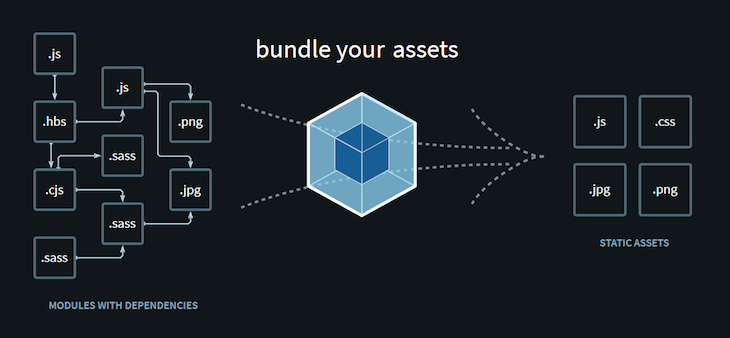
Webpack Init html

 
//==================== Create webpack CLI ===================//
C:\Users\BV_Computer\Downloads\beginer-webpack> npm init -y

{
  "name": "beginer-webpack",
  "version": "1.0.0",
  "description": "",
  "main": "index.js",
  "scripts": {
    "test": "echo \"Error: no test specified\" && exit 1"
  },
  "keywords": [],
  "author": "",
  "license": "ISC"
}
npm i webpack --save-dev npm i webpack-cli --save-dev mkdir src // Tạo file type nul > index.js (Đặt console.log('Hello!')) npx webpack --mode development (Sau khi chạy lệnh này sẽ render ra folder dist) Thêm vào script của file package.json webpack --mode development webpack --mode production //================ Install html-plugin config.js ================// npm i html-webpack-plugin --save-dev // Tạo file type nul > webpack.config.js
const HtmlWebpackPlugin = require('html-webpack-plugin');
const path = require('path');

module.exports = {
  entry: {
    main: path.resolve(__dirname, './src/index.js'),
  },
  output: {
    filename: '[name].bundle.js',
    path: path.resolve(__dirname, 'dist'),
  },
  plugins: [
      new HtmlWebpackPlugin({
        title: 'Demo webpack'
      })
  ]
};
npm run dev (Mở browser dist/index.html để check console.log hiển thị chữ hello!) //================= Install server =================// npm i webpack-dev-server --save-dev https://webpack.js.org/configuration/dev-server/#root
const HtmlWebpackPlugin = require("html-webpack-plugin");
const path = require("path");

module.exports = {
  entry: {
    main: path.resolve(__dirname, "./src/index.js"),
  },
  output: {
    filename: "[name].bundle.js",
    path: path.resolve(__dirname, "dist"),
  },
  devServer: {
    static: {
      directory: path.join(__dirname, "./dist"),
    },
    compress: true,
    port: 9000,
  },
  plugins: [
    new HtmlWebpackPlugin({
      title: "Demo webpack",
    }),
  ],
};

// Update lại script file package.json webpack serve --mode development // Kiểm tra http://localhost:9000/ (Xem console) //================ Install babel =============// npm i babel-loader @babel/core @babel/preset-en v --save-dev https://webpack.js.org/loaders/babel-loader/#root
const HtmlWebpackPlugin = require("html-webpack-plugin");
const path = require("path");

module.exports = {
  entry: {
    main: path.resolve(__dirname, "./src/index.js"),
  },
  output: {
    filename: "[name].bundle.js",
    path: path.resolve(__dirname, "dist"),
  },
  devServer: {
    static: {
      directory: path.join(__dirname, "./dist"),
    },
    compress: true,
    port: 9000,
  },
  plugins: [
    new HtmlWebpackPlugin({
      title: "Demo webpack",
    }),
  ],
  module: {
    rules: [
      {
        test: /\.?js$/,
        exclude: /(node_modules|bower_components)/,
        use: {
          loader: "babel-loader",
          options: {
            presets: ["@babel/preset-env"],
          },
        },
      },
    ],
  },
};

// Tạo file component.js type nul > component.js
const component = () => {
    const element = document.createElement('h2');
    element.innerHTML = "Hey this is new component";
    return element;
}
export default component;
// Update file index.js
import component from "./component";

document.body.appendChild(component());
// Start app npm run dev
//=============== Install css & syle loader =============// npm i css-loader style-loader --save-dev https://webpack.js.org/guides/asset-management/#loading-images
rules: [
      {
        test: /\.css$/i,
        use: ["style-loader", "css-loader"],
      },
      {
        test: /\.(png|svg|jpg|jpeg|gif)$/i,
        type: 'asset/resource',
      },
],
// index.js
import component from "./component";

import logo from "./images/logo-on-dark-bg.png";

import "./styles/style.css";

const img = document.createElement('img');
img.src = logo;
img.width = '300';
document.body.appendChild(img);

document.body.appendChild(component());
// npm run dev

27 May 2022

JavaScript-Interview-Questions

JavaScript Interview Questions ( vES6 )

24 May 2022

JavaScript Interview Questions & Answers


14 May 2022

For loop Javascript

13 May 2022

ES5 vs ES2015 - Something about ES6 Javascript Standard

14 April 2022

Câu hỏi JavaScript Advanced

30 March 2022

Convert array bên dưới sang dạng tree theo key - Javascript

Convert array bên dưới sang dạng tree theo key - Javascript


Javascript convert tree - JSON
2022
interface ObjectNode {
  position: string;
  name: string;
  symbol: string;
  weight ? : number;
  children ? : ObjectNode[];
}
var exampleData = [{
      position: 1,
      name: 'Hydrogen',
      weight: 1.0079,
      symbol: 'H'
  }, {
      position: 1,
      name: 'Helium',
      weight: 4.0026,
      symbol: 'H'
  }, {
      position: 2,
      name: 'Lithium',
      weight: 6.941,
      symbol: 'L'
  }, {
      position: 3,
      name: 'Beryllium',
      weight: 9.0122,
      symbol: 'B'
  }, {
      position: 4,
      name: 'Boron',
      weight: 10.811,
      symbol: 'B'
  }, {
      position: 5,
      name: 'Carbon',
      weight: 12.0107,
      symbol: 'C'
  }, {
      position: 5,
      name: 'Nitrogen',
      weight: 14.0067,
      symbol: 'N'
  }, {
      position: 6,
      name: 'Oxygen',
      weight: 15.9994,
      symbol: 'O'
  }, {
      position: 7,
      name: 'Fluorine',
      weight: 18.9984,
      symbol: 'F'
  }, {
      position: 8,
      name: 'Neon',
      weight: 20.1797,
      symbol: 'N'
  }, ]
  // expect
  // key = ['symbol']
var TREE1 = [{
      symbol: 'H',
      children: [{
          position: 1,
          name: 'Hydrogen',
          weight: 1.0079,
          symbol: 'H'
      }, {
          position: 1,
          name: 'Helium',
          weight: 4.0026,
          symbol: 'H'
      }, ]
  }, {
      symbol: 'L',
      children: [{
          position: 2,
          name: 'Lithium',
          weight: 6.941,
          symbol: 'L'
      }, ]
  }, ]
  // OR -------------------------------------------------------------------------
  // key = ['symbol', 'position']
var TREE2 = [{
  symbol: 'H',
  children: [{
      position: 1,
      children: [{
          position: 1,
          name: 'Hydrogen',
          weight: 1.0079,
          symbol: 'H'
      }, {
          position: 1,
          name: 'Helium',
          weight: 4.0026,
          symbol: 'H'
      }, ]
  }]
}, {
  symbol: 'N',
  children: [{
      position: 5,
      children: [{
          position: 5,
          name: 'Nitrogen',
          weight: 14.0067,
          symbol: 'N'
      }]
  }, {
      position: 8,
      children: [{
          position: 8,
          name: 'Neon',
          weight: 20.1797,
          symbol: 'N'
      }]
  }]
}, ]
// Cách 1
var exampleField = ['symbol', 'position', 'name']
function groupByFields(items: any[], fields: any[]): any[] {
  if (!fields.length) return items;
  const grField = fields[0];
  const keys = [...new Set(items.map(item => item[grField]))];
  return keys.map(key => {
      const fItems = items.filter(item => item[grField] === key);
      return {
          [grField]: key,
          children: groupByFields(fItems, fields.slice(1))
      }
  });
}
console.log(groupByFields(exampleData, exampleField)); // Cách 2
var exampleField = ['symbol', 'position'];
function buildTree(items, ...keys) {
    const result = [];
    const keySet = new Set();
    const groupByKey = keys.shift();
    items.forEach(item => {
        if (!keySet.has(item[groupByKey])) {
            keySet.add(item[groupByKey]);
            result.push({ [groupByKey]: item[groupByKey], children: [item] });
        }
        else {
            result.find((res) => res[groupByKey] === item[groupByKey]).children.push(item);
        }
    });
    if (keys.length) {
        result.forEach((res) => {
            res.children = buildTree(res.children, ...keys);
        });
    }
    return result;
}
console.log(new Set(['1', '1', '2', '3']));

Demo1 | Demo2

20 November 2021

Regex : QRCode type detection - Javascript

 QRCode type detection - Javascript

QRCode type detection
2021
let TYPE_TEXT = "TEXT";
let TYPE_URL = "URL";
let TYPE_PHONE = "PHONE NUMBER";
let TYPE_WIFI = "WIFI";
let TYPE_UPI = "UPI";
//#region type detection
function isUrl(decodedText) {
  var expression1 =
    /^((javascript:[\w-_]+(\([\w-_\s,.]*\))?)|(mailto:([\w\u00C0-\u1FFF\u2C00-\uD7FF-_]+\.)*[\w\u00C0-\u1FFF\u2C00-\uD7FF-_]+@([\w\u00C0-\u1FFF\u2C00-\uD7FF-_]+\.)*[\w\u00C0-\u1FFF\u2C00-\uD7FF-_]+)|(\w+:\/\/(([\w\u00C0-\u1FFF\u2C00-\uD7FF-]+\.)*([\w\u00C0-\u1FFF\u2C00-\uD7FF-]*\.?))(:\d+)?(((\/[^\s#$%^&*?]+)+|\/)(\?[\w\u00C0-\u1FFF\u2C00-\uD7FF:;&%_,.~+=-]+)?)?(#[\w\u00C0-\u1FFF\u2C00-\uD7FF-_]+)?))$/g;
  var regexExp1 = new RegExp(expression1);
  if (decodedText.match(regexExp1)) {
    return true;
  }

  var expression2 =
    /(http(s)?:\/\/.)?(www\.)?[-a-zA-Z0-9@:%._\+~#=]{2,256}\.[a-z]{2,6}\b([-a-zA-Z0-9@:%_\+.~#?&//=]*)/g;
  var regexExp2 = new RegExp(expression2);

  if (decodedText.match(regexExp2)) {
    return true;
  }
  return false;
}

function isPhoneNumber(decodedText) {
  var expression = /tel:[+]*[0-9]{3,}/g;
  var regexExp = new RegExp(expression);
  return decodedText.match(regexExp);
}

function isWifi(decodedText) {
  var expression = /WIFI:S:(.*);T:(.*);P:(.*);H:(.*);;/g;
  var regexExp = new RegExp(expression);
  return decodedText.match(regexExp);
}

function isUpi(decodedText) {
  try {
    var upiUri = new URL(decodedText);
    if (!upiUri || upiUri == null) {
      return false;
    }
    return upiUri.protocol === 'upi:';
  } catch (err) {
    return false;
  }
}

function detectType(decodedText) {
  if (isUrl(decodedText)) {
    return TYPE_URL;
  }

  if (isPhoneNumber(decodedText)) {
    return TYPE_PHONE;
  }

  if (isWifi(decodedText)) {
    return TYPE_WIFI;
  }

  if (isUpi(decodedText)) {
    return TYPE_UPI;
  }

  return TYPE_TEXT;
}
//#endregion

24 July 2021

Javascrip Fetch example console


Fetch example

2021
var myHeaders = new Headers();
myHeaders.append("Authorization", "Basic bWljcm9zaXRlOlhhWkxwd1dieER4eW00N1Y=");
myHeaders.append("Content-Type", "application/json");

var raw = JSON.stringify({
  "Username": "phongph",
  "Subject": "subject test",
  "Body": "body test",
  "ActionId": "9618",
  "KeyValue": "ycmh",
  "SystemId": 34002
});

var requestOptions = {
  method: 'POST',
  headers: myHeaders,
  body: raw,
  redirect: 'follow'
};

fetch("http://demo:88/api/notification/create", requestOptions)
  .then(response => response.text())
  .then(result => console.log(result))
  .catch(error => console.log('error', error));

19 May 2021

Removing first and last character from a string in JavaScript


Using slice method

let str = '/hello/';

//slice starts from index 1 and ends before last index
console.log(str.slice(1,-1));

//output --> 'hello'

Note: Negative index -1 is equivalent to str.length-1 in slice method.

Using substring method

let str = '/hello/';

console.log(str.substring(1,str.length-1));

//output --> 'hello'

Using both slice and substring methods

let str = '/hello/';

console.log(str.substring(1).slice(0,-1));

//output --> 'hello'

Using replace method

let str = '/hello/';

console.log(str.replace(/^(.)|(.)$/g,''));

//output --> 'hello'


BACK TO TOP

Xuống cuối trang