• Thế Giới Giải Mã

    Bí ẩn nhân loại Leonardo Da Vinci

  • Thế Giới Giải Mã

    Anh hùng thầm lặng Nikola Tesla

  • Thế Giới Giải Mã

    Thần đèn Thomas Edison

  • Thế Giới Giải Mã

    Người thôi miên Adolf Hitler

Showing posts with label AAD1. Show all posts

22 April 2016

TEST ADD1 Aptech FPT 2016 Eclipse

[TEST ADD1 Aptech fpt - Eclipse]


>>Create the program<<

How to create JtextArea scrollbar Eclipse?


How to create title eclipse?

OR


userFriendly .java
 package userFriendly;
import java.awt.EventQueue;
import java.awt.Font;
import java.awt.event.ActionEvent;
import java.awt.event.ActionListener;
import java.io.BufferedWriter;
import java.io.File;
import java.io.FileWriter;
import java.io.IOException;

import javax.swing.DefaultComboBoxModel;
import javax.swing.ImageIcon;
import javax.swing.JButton;
import javax.swing.JComboBox;
import javax.swing.JFrame;
import javax.swing.JLabel;
import javax.swing.JOptionPane;
import javax.swing.JScrollPane;
import javax.swing.JTextArea;
import javax.swing.JTextField;

public class userFriendly {

 private JFrame frame;
 private JTextField txtID;
 private JTextField txtName;
 private JTextField txtDay;

 /**
  * Launch the application.
  */
 public static void main(String[] args) {
  EventQueue.invokeLater(new Runnable() {
   public void run() {
    try {
     userFriendly window = new userFriendly();
     window.frame.setVisible(true);
    } catch (Exception e) {
     e.printStackTrace();
    }
   }
  });
 }

 /**
  * Create the application.
  */
 public userFriendly() {
  initialize();
  frame.setTitle("Design Preview [EmployeeLeave]");
  
 }

 /**
  * Initialize the contents of the frame.
  */
 private void initialize() {
  frame = new JFrame();
  frame.setBounds(450, 150, 488, 432);
  frame.setDefaultCloseOperation(JFrame.EXIT_ON_CLOSE);
  frame.getContentPane().setLayout(null);
  
  JLabel lblEmployeeLeaveApplication = new JLabel("Employee Leave Application");
  lblEmployeeLeaveApplication.setFont(new Font("Tahoma", Font.BOLD, 14));
  lblEmployeeLeaveApplication.setBounds(126, 11, 221, 35);
  frame.getContentPane().add(lblEmployeeLeaveApplication);
  
  txtID = new JTextField();
  txtID.setBounds(201, 79, 116, 20);
  frame.getContentPane().add(txtID);
  txtID.setColumns(10);
  
  txtName = new JTextField();
  txtName.setBounds(201, 115, 116, 20);
  frame.getContentPane().add(txtName);
  txtName.setColumns(10);
  
  JComboBox comboBox = new JComboBox();
  comboBox.setModel(new DefaultComboBoxModel(new String[] {"SL", "LS"}));
  comboBox.setBounds(199, 157, 47, 20);
  frame.getContentPane().add(comboBox);
  
  txtDay = new JTextField();
  txtDay.setBounds(199, 201, 30, 20);
  frame.getContentPane().add(txtDay);
  txtDay.setColumns(10);
  
  JScrollPane scrollPane = new JScrollPane();
  scrollPane.setBounds(193, 243, 195, 70);
  frame.getContentPane().add(scrollPane);
  
  JTextArea textArea = new JTextArea();
  scrollPane.setViewportView(textArea);
  
  JButton btnSave = new JButton("Save");
  btnSave.addActionListener(new ActionListener() {
   public void actionPerformed(ActionEvent e) {
    File file = new File("E://leave_records.txt");
    if(txtID.getText().length() != 0 && txtName.getText().length() !=0 && txtDay.getText().length() != 0
      && textArea.getText().length() !=0){
    
    try {
     file.createNewFile();
     FileWriter fw  = new FileWriter(file);
     BufferedWriter bw = new BufferedWriter(fw);
     String data = txtID.getText();
     String data1 = txtName.getText();
     String data2 = txtDay.getText();
     String data3 = textArea.getText();
     String data4 = comboBox.getSelectedItem().toString();
    
     bw.write(data);
     bw.write(data1);
     bw.write(data2);
     bw.write(data3);
     bw.write(data4);
     bw.close();
     fw.close();
   
    } catch (IOException e1) {
     // TODO Auto-generated catch block
     e1.printStackTrace();
    }
    }else{
     JOptionPane.showMessageDialog(null, "Khong duoc de trong");
    }
   }
  });
  btnSave.setIcon(new ImageIcon("C:\\Users\\Lonely\\workspace\\ADD1\\icon\\Save-icon.png"));
  btnSave.setBounds(75, 332, 89, 23);
  frame.getContentPane().add(btnSave);
  
  JButton btnReset = new JButton("Reset");
  btnReset.setIcon(new ImageIcon("C:\\Users\\Lonely\\workspace\\ADD1\\icon\\Actions-edit-redo-icon.png"));
  btnReset.addActionListener(new ActionListener() {
   public void actionPerformed(ActionEvent e) {
    txtID.setText("");
    txtName.setText("");
    txtDay.setText("");
    textArea.setText("");
   }
  });
  btnReset.setBounds(185, 332, 89, 23);
  frame.getContentPane().add(btnReset);
  
  JButton btnExit = new JButton("Exit");
  btnExit.setIcon(new ImageIcon("C:\\Users\\Lonely\\workspace\\ADD1\\icon\\Actions-edit-delete-icon.png"));
  btnExit.addActionListener(new ActionListener() {
   public void actionPerformed(ActionEvent arg0) {
    System.exit(0);
   }
  });
  btnExit.setBounds(299, 332, 89, 23);
  frame.getContentPane().add(btnExit);
  
  JLabel lblEmpId = new JLabel("Emp ID:");
  lblEmpId.setBounds(75, 79, 46, 14);
  frame.getContentPane().add(lblEmpId);
  
  JLabel lblNewLabel = new JLabel("Employee Name:");
  lblNewLabel.setBounds(75, 118, 102, 14);
  frame.getContentPane().add(lblNewLabel);
  
  JLabel lblLeaveType = new JLabel("Leave Type:");
  lblLeaveType.setBounds(75, 157, 75, 14);
  frame.getContentPane().add(lblLeaveType);
  
  JLabel lblNoOfDays = new JLabel("No of days:");
  lblNoOfDays.setBounds(75, 201, 75, 14);
  frame.getContentPane().add(lblNoOfDays);
  
  JLabel lblNewLabel_1 = new JLabel("Reason:");
  lblNewLabel_1.setBounds(75, 239, 46, 14);
  frame.getContentPane().add(lblNewLabel_1);
 }
}

 Save


Validating


Reset


Exit


Create foder icon copy pates => to foder


16 April 2016

Java Combo Boxes


Java Combo Boxes

public void actionPerformed(ActionEvent e) {
    String itemText = (String) comboBox.getSelectedItem();
    textField.setText(itemText);
   }

15 April 2016

Swing: The dialog boxes (2) Hiển thi thông báo dialog trong java swing GUI

Swing: The dialog boxes (2)

The basics of dialogues

Display Message

You use the method showMessageDialog class JOptionPane .
This method has several signatures.

example 1

JOptionPane.showMessageDialog (mainFrame, "message dialog");

example 2

JOptionPane.showMessageDialog (mainFrame, 
                               "error", 
                               "title", 
                               JOptionPane.ERROR_MESSAGE);
view source

Boxes confirmation

Method showConfirmDialog class JOptionPane

example 1

int answer = JOptionPane.showConfirmDialog (mainFrame, "message");

example 2

  
int answer = JOptionPane.showConfirmDialog (mainFrame, 
                                             "message", 
                                             "title", 
                                             JOptionPane.YES_NO_OPTION);
view source

Transmission input

Method showInputDialog class JOptionPane .
This class allows you to enter an option in edit fields or select from a list provided.

example 1

String input = JOptionPane.showInputDialog (mainFrame, "message");
Note: If the user clicks the button Cancel , the method return an empty string regardless seizure

example 2

String [] = {days "Monday", "Tuesday", "Wednesday", "Thursday", "Friday", "Saturday", "Sunday"}; 
String input = (String) JOptionPane.showInputDialog (mainFrame, 
                                                       "choose a day ", 
                                                       " title ", 
                                                       JOptionPane.QUESTION_MESSAGE, 
                                                       null, 
                                                       days, days [0]);  
  
view source

Button selection box

Method showOptionDialog class JOptionPane

Example

String [] = {days "Monday", "Tuesday", "Wednesday", "Thursday", "Friday", "Saturday", "Sunday"};   
int choice = JOptionPane.showOptionDialog (mainFrame, 
                                          "Choose a day" 
                                          "Title", 
                                          JOptionPane.OK_CANCEL_OPTION, 
                                          JOptionPane.QUESTION_MESSAGE, 
                                          null 
                                          day, 
                                          "Saturday");
  
Remaque: If the user closes the dialog without clicking a button, the reference method -1.

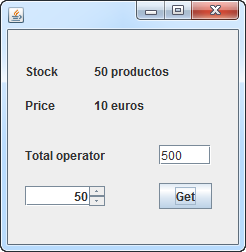
JSpinner in Eclipse - Product price 2

Example: JSpinner in Eclipse - Product price 
import java.awt.BorderLayout;
import java.awt.EventQueue;

import javax.swing.JFrame;
import javax.swing.JPanel;
import javax.swing.border.EmptyBorder;
import javax.swing.GroupLayout;
import javax.swing.GroupLayout.Alignment;
import javax.swing.JLabel;
import javax.swing.JSpinner;
import javax.swing.SpinnerNumberModel;
import javax.swing.JButton;
import java.awt.event.ActionListener;
import java.awt.event.ActionEvent;
import javax.swing.JTextField;
import javax.swing.LayoutStyle.ComponentPlacement;
import javax.swing.JList;
import javax.swing.JScrollPane;
import javax.swing.JTextArea;
import java.awt.Font;

public class prod extends JFrame {

 private JPanel contentPane;
 private JSpinner spinner;
 private JLabel txtPrecio;
 private JLabel txtStock;
 private JButton btnGet;
 private int maxStock=50;
 private int intPrice=10;
 private JLabel lblTotal;
 private JTextField txtTotal;
 private JTextField txtTotales;

 /**
  * Launch the application.
  */
 public static void main(String[] args) {
  EventQueue.invokeLater(new Runnable() {
   public void run() {
    try {
     prod frame = new prod();
     frame.setVisible(true);
    } catch (Exception e) {
     e.printStackTrace();
    }
   }
  });
 }

 /**
  * Create the frame.
  */
 public prod() {
  setDefaultCloseOperation(JFrame.EXIT_ON_CLOSE);
  setBounds(100, 100, 310, 280);
  contentPane = new JPanel();
  contentPane.setBorder(new EmptyBorder(5, 5, 5, 5));
  setContentPane(contentPane);
  
  JLabel lblStock = new JLabel("Stock");
  lblStock.setBounds(15, 33, 52, 14);
  
  JLabel lblPeecio = new JLabel("Price");
  lblPeecio.setBounds(15, 65, 52, 14);
  
  txtStock = new JLabel("");
  txtStock.setFont(new Font("Tahoma", Font.BOLD, 11));
  txtStock.setBounds(77, 33, 90, 14);
  
  txtPrecio = new JLabel(intPrice+" euros");
  txtPrecio.setFont(new Font("Tahoma", Font.BOLD, 11));
  txtPrecio.setBounds(77, 65, 79, 14);
  
  spinner = new JSpinner();
  spinner.setBounds(121, 111, 135, 20);
  spinner.setModel(new SpinnerNumberModel(0, 0, maxStock, 1));  

  btnGet = new JButton("Get");
  btnGet.setBounds(164, 33, 92, 46);
  btnGet.addActionListener(new ActionListener() {
   public void actionPerformed(ActionEvent arg0) {
    hacerCompra();
   }
  });
  
  lblTotal = new JLabel("Total ");
  lblTotal.setBounds(15, 163, 69, 14);
  
  txtTotal = new JTextField();
  txtTotal.setBounds(121, 158, 135, 25);
  txtTotal.setText("0");
  txtTotal.setColumns(10);
  
  JList list = new JList();
  list.setBounds(93, 190, 1, 1);
  
  JList list_1 = new JList();
  list_1.setBounds(376, 60, 1, 1);
  
  JList list_2 = new JList();
  list_2.setBounds(298, 209, 1, 1);
  
  JScrollPane scrollPane = new JScrollPane();
  scrollPane.setBounds(266, 65, 2, 2);
  contentPane.setLayout(null);
  contentPane.add(list);
  contentPane.add(list_1);
  contentPane.add(list_2);
  contentPane.add(scrollPane);
  contentPane.add(spinner);
  contentPane.add(lblStock);
  contentPane.add(lblPeecio);
  contentPane.add(txtPrecio);
  contentPane.add(txtStock);
  contentPane.add(btnGet);
  contentPane.add(lblTotal);
  contentPane.add(txtTotal);
  
  JLabel lblStock_1 = new JLabel("Stock");
  lblStock_1.setBounds(15, 114, 69, 14);
  contentPane.add(lblStock_1);
  
  txtTotales = new JTextField();
  txtTotales.setText("0");
  txtTotales.setBounds(121, 207, 135, 20);
  contentPane.add(txtTotales);
  txtTotales.setColumns(10);
  
  JLabel lblTotales = new JLabel("Totales");
  lblTotales.setBounds(15, 210, 69, 14);
  contentPane.add(lblTotales);
 }
 void hacerCompra(){
  int valueSpinner = (Integer) spinner.getValue();
  int total = valueSpinner * intPrice;
  txtTotal.setText(total+"");
  maxStock = 50 - valueSpinner;
  txtStock.setText(Integer.toString(maxStock)+" Product");
 

  int totales = Integer.parseInt(txtTotales.getText().toString());
  totales = total+totales;
  txtTotales.setText(Integer.toString(totales));
 }

}


JSpinner in Eclipse - Product price

Example: JSpinner in Eclipse - Product price 
import java.awt.BorderLayout;
import java.awt.EventQueue;

import javax.swing.JFrame;
import javax.swing.JPanel;
import javax.swing.border.EmptyBorder;
import javax.swing.GroupLayout;
import javax.swing.GroupLayout.Alignment;
import javax.swing.JLabel;
import javax.swing.JSpinner;
import javax.swing.SpinnerNumberModel;
import javax.swing.JButton;
import java.awt.event.ActionListener;
import java.awt.event.ActionEvent;
import javax.swing.JTextField;
import javax.swing.LayoutStyle.ComponentPlacement;

public class prod extends JFrame {

 private JPanel contentPane;
 private JSpinner spinner;
 private JLabel txtPrecio;
 private JLabel txtStock;
 private JButton btnGet;
 private int maxStock=50;
 private int intPrice=10;
 private JLabel lblTotalDala;
 private JTextField txtTotal;

 /**
  * Launch the application.
  */
 public static void main(String[] args) {
  EventQueue.invokeLater(new Runnable() {
   public void run() {
    try {
     prod frame = new prod();
     frame.setVisible(true);
    } catch (Exception e) {
     e.printStackTrace();
    }
   }
  });
 }

 /**
  * Create the frame.
  */
 public prod() {
  setDefaultCloseOperation(JFrame.EXIT_ON_CLOSE);
  setBounds(100, 100, 246, 252);
  contentPane = new JPanel();
  contentPane.setBorder(new EmptyBorder(5, 5, 5, 5));
  setContentPane(contentPane);
  
  JLabel lblStock = new JLabel("Stock");
  
  JLabel lblPeecio = new JLabel("Price");
  
  txtStock = new JLabel(maxStock+" productos");
  
  txtPrecio = new JLabel("10 euros");
  
  spinner = new JSpinner();
  spinner.setModel(new SpinnerNumberModel(0, 0, maxStock, 1));
  
  btnGet = new JButton("Get");
  btnGet.addActionListener(new ActionListener() {
   public void actionPerformed(ActionEvent arg0) {
    hacerCompra();
   }
  });
  
  lblTotalDala = new JLabel("Total operator");
  
  txtTotal = new JTextField();
  txtTotal.setText("0");
  txtTotal.setColumns(10);
  GroupLayout gl_contentPane = new GroupLayout(contentPane);
  gl_contentPane.setHorizontalGroup(
   gl_contentPane.createParallelGroup(Alignment.LEADING)
    .addGroup(gl_contentPane.createSequentialGroup()
     .addContainerGap()
     .addGroup(gl_contentPane.createParallelGroup(Alignment.LEADING, false)
      .addGroup(gl_contentPane.createSequentialGroup()
       .addGroup(gl_contentPane.createParallelGroup(Alignment.LEADING)
        .addComponent(lblStock)
        .addComponent(lblPeecio))
       .addGap(36)
       .addGroup(gl_contentPane.createParallelGroup(Alignment.LEADING)
        .addComponent(txtPrecio)
        .addComponent(txtStock))
       .addGap(30))
      .addGroup(gl_contentPane.createSequentialGroup()
       .addGroup(gl_contentPane.createParallelGroup(Alignment.TRAILING, false)
        .addComponent(spinner, Alignment.LEADING)
        .addComponent(lblTotalDala, Alignment.LEADING, GroupLayout.DEFAULT_SIZE, GroupLayout.DEFAULT_SIZE, Short.MAX_VALUE))
       .addGap(54)
       .addGroup(gl_contentPane.createParallelGroup(Alignment.LEADING)
        .addComponent(txtTotal, GroupLayout.PREFERRED_SIZE, 52, GroupLayout.PREFERRED_SIZE)
        .addComponent(btnGet))
       .addGap(239))))
  );
  gl_contentPane.setVerticalGroup(
   gl_contentPane.createParallelGroup(Alignment.LEADING)
    .addGroup(gl_contentPane.createSequentialGroup()
     .addGap(28)
     .addGroup(gl_contentPane.createParallelGroup(Alignment.BASELINE)
      .addComponent(lblStock)
      .addComponent(txtStock))
     .addGap(18)
     .addGroup(gl_contentPane.createParallelGroup(Alignment.BASELINE)
      .addComponent(lblPeecio)
      .addComponent(txtPrecio))
     .addGap(32)
     .addGroup(gl_contentPane.createParallelGroup(Alignment.BASELINE)
      .addComponent(lblTotalDala)
      .addComponent(txtTotal, GroupLayout.PREFERRED_SIZE, GroupLayout.DEFAULT_SIZE, GroupLayout.PREFERRED_SIZE))
     .addGap(18)
     .addGroup(gl_contentPane.createParallelGroup(Alignment.BASELINE)
      .addComponent(spinner, GroupLayout.PREFERRED_SIZE, GroupLayout.DEFAULT_SIZE, GroupLayout.PREFERRED_SIZE)
      .addComponent(btnGet))
     .addContainerGap(85, Short.MAX_VALUE))
  );
  contentPane.setLayout(gl_contentPane);
 }
 void hacerCompra(){
  int valueSpinner = (Integer) spinner.getValue();
  int total = valueSpinner * intPrice;
  txtTotal.setText(total+"");
 }
}
Link: https://www.youtube.com/watch?v=S62TnjdFnBs


Get text & JTextArea in Eclipse Swing

Get text
import java.awt.EventQueue;

import javax.swing.JFrame;
import javax.swing.JTextField;
import javax.swing.JButton;
import java.awt.event.ActionListener;
import java.awt.event.ActionEvent;

public class SwingGet {

 private JFrame frame;
 private JTextField textField;

 /**
  * Launch the application.
  */
 public static void main(String[] args) {
  EventQueue.invokeLater(new Runnable() {
   public void run() {
    try {
     SwingGet window = new SwingGet();
     window.frame.setVisible(true);
    } catch (Exception e) {
     e.printStackTrace();
    }
   }
  });
 }

 /**
  * Create the application.
  */
 public SwingGet() {
  initialize();
 }

 /**
  * Initialize the contents of the frame.
  */
 private void initialize() {
  frame = new JFrame();
  frame.setBounds(100, 100, 252, 171);
  frame.setDefaultCloseOperation(JFrame.EXIT_ON_CLOSE);
  frame.getContentPane().setLayout(null);
  
  textField = new JTextField();
  textField.setBounds(39, 25, 158, 26);
  frame.getContentPane().add(textField);
  textField.setColumns(10);
  
  JButton btnGet = new JButton("Get");
  btnGet.addActionListener(new ActionListener() {
public void actionPerformed(ActionEvent arg0) { textField.setText("Hello World"); textField.getText(); } }); btnGet.setBounds(69, 78, 89, 23); frame.getContentPane().add(btnGet); } }
JTextArea in Eclipse


view images


14 April 2016

Swing Login Form in Java Eclip

Swing Login Form in Java Eclip
package swing;

import java.awt.EventQueue;

import javax.swing.JFrame;
import javax.swing.JButton;
import javax.swing.JLabel;
import java.awt.event.ActionListener;
import java.awt.event.ActionEvent;
import javax.swing.JTextField;
import javax.swing.JCheckBox;
import java.awt.Font;
import javax.swing.JPasswordField;

public class SwingApp {

 private JFrame frame;
 private JTextField textUser;
 private JPasswordField txtPass;

 /**
  * Launch the application.
  */
 public static void main(String[] args) {
  EventQueue.invokeLater(new Runnable() {
   public void run() {
    try {
     SwingApp window = new SwingApp();
     window.frame.setVisible(true);
    } catch (Exception e) {
     e.printStackTrace();
    }
   }
  });
 }

 /**
  * Create the application.
  */
 public SwingApp() {
  initialize();
 }

 /**
  * Initialize the contents of the frame.
  */
 private void initialize() {
  frame = new JFrame();
  frame.setBounds(100, 100, 312, 287);
  frame.setDefaultCloseOperation(JFrame.EXIT_ON_CLOSE);
  frame.getContentPane().setLayout(null);

  JLabel lblNewLabel = new JLabel("Username");
  lblNewLabel.setBounds(25, 75, 77, 14);
  frame.getContentPane().add(lblNewLabel);

  JLabel lblNewLabel_1 = new JLabel("Password");
  lblNewLabel_1.setBounds(25, 113, 71, 14);
  frame.getContentPane().add(lblNewLabel_1);

  textUser = new JTextField();
  textUser.setBounds(103, 72, 119, 20);
  frame.getContentPane().add(textUser);
  textUser.setColumns(10);

  JCheckBox Remember = new JCheckBox("Remember password?");
  Remember.setBounds(41, 143, 164, 23);
  frame.getContentPane().add(Remember);

  JLabel lblMessager = new JLabel("");
  lblMessager.setFont(new Font("Tahoma", Font.PLAIN, 12));
  lblMessager.setBounds(21, 208, 265, 26);
  frame.getContentPane().add(lblMessager);

  JButton btnLogin = new JButton("Login");
  btnLogin.addActionListener(new ActionListener() {
public void actionPerformed(ActionEvent e) { if (textUser.getText().equalsIgnoreCase("admin") && txtPass.getText().equals("12345") ) { if (Remember.isSelected()) { lblMessager.setText("Login successfully with remembering option"); } else { lblMessager.setText("Login successfully without remembering option"); } }else{ lblMessager.setText("Login false!"); } } }); btnLogin.setBounds(62, 173, 71, 23); frame.getContentPane().add(btnLogin); JLabel lblLogin = new JLabel("Login"); lblLogin.setFont(new Font("Segoe UI Symbol", Font.PLAIN, 26)); lblLogin.setBounds(103, 11, 68, 40); frame.getContentPane().add(lblLogin); txtPass = new JPasswordField(); txtPass.setBounds(103, 110, 119, 20); frame.getContentPane().add(txtPass); JButton btnReset = new JButton("Reset"); btnReset.addActionListener(new ActionListener() {
public void actionPerformed(ActionEvent e) { textUser.setText(""); txtPass.setText(""); lblMessager.setText(""); Remember.setSelected(false); } }); btnReset.setBounds(170, 173, 71, 23); frame.getContentPane().add(btnReset); } }

Show mesager and clear swing

Show mesager and clear
package swing;

import java.awt.EventQueue;

import javax.swing.JFrame;
import javax.swing.JTextField;
import javax.swing.JButton;
import javax.swing.JLabel;
import java.awt.Font;
import java.awt.event.ActionListener;
import java.awt.event.ActionEvent;
import java.awt.Color;
import javax.swing.ImageIcon;
import javax.swing.JPanel;

public class SingApp {

 private JFrame frame;
 private JTextField textField2;
 private JTextField textField1;

 /**
  * Launch the application.
  */
 public static void main(String[] args) {
  EventQueue.invokeLater(new Runnable() {
   public void run() {
    try {
     SingApp window = new SingApp();
     window.frame.setVisible(true);
    } catch (Exception e) {
     e.printStackTrace();
    }
   }
  });
 }

 /**
  * Create the application.
  */
 public SingApp() {
  initialize();
 }

 /**
  * Initialize the contents of the frame.
  */
 private void initialize() {
  frame = new JFrame();
  frame.setBounds(100, 100, 450, 300);
  frame.setDefaultCloseOperation(JFrame.EXIT_ON_CLOSE);
  frame.getContentPane().setLayout(null);
  
  textField2 = new JTextField();
  textField2.setBounds(24, 131, 384, 79);
  frame.getContentPane().add(textField2);
  textField2.setColumns(10);
  
  JButton btnNewButton = new JButton("Search");
  btnNewButton.addActionListener(new ActionListener() {
public void actionPerformed(ActionEvent arg0) { String messager = "Search: "+textField1.getText(); textField2.setText(messager); } }); btnNewButton.setBounds(125, 97, 89, 23); frame.getContentPane().add(btnNewButton); textField1 = new JTextField(); textField1.setBounds(24, 66, 384, 20); frame.getContentPane().add(textField1); textField1.setColumns(10); JButton btnClease = new JButton("Clear"); btnClease.addActionListener(new ActionListener() { public void actionPerformed(ActionEvent arg0) { textField1.setText(""); textField2.setText(""); } }); btnClease.setBounds(239, 97, 89, 23); frame.getContentPane().add(btnClease); JLabel lblShowMessagerAnd = new JLabel("Show Messager and Clear"); lblShowMessagerAnd.setFont(new Font("Tahoma", Font.PLAIN, 21)); lblShowMessagerAnd.setBounds(102, 11, 272, 32); frame.getContentPane().add(lblShowMessagerAnd); JLabel lblDesignByMr = new JLabel("Design by Mr.24!"); lblDesignByMr.setFont(new Font("Viner Hand ITC", Font.PLAIN, 14)); lblDesignByMr.setBounds(293, 228, 115, 23); frame.getContentPane().add(lblDesignByMr); } }


Button Swing Eclipse in Java multiplication and add

Example: Button multiplication and add Eclipse in Java
package swing;

import java.awt.EventQueue;
import java.awt.event.ActionEvent;
import java.awt.event.ActionListener;
import java.util.Enumeration;

import javax.swing.AbstractButton;
import javax.swing.ButtonGroup;
import javax.swing.JButton;
import javax.swing.JFrame;
import javax.swing.JLabel;
import javax.swing.JOptionPane;
import javax.swing.JRadioButton;
import javax.swing.JTextField;
import java.awt.Font;

public class swingapp {

 private JFrame frame;
 private final ButtonGroup buttonGroup = new ButtonGroup();
 private JTextField textFielda;
 private JTextField textFieldb;
 private JTextField textFieldc;

 /**
  * Launch the application.
  */
 public static void main(String[] args) {
  EventQueue.invokeLater(new Runnable() {
   public void run() {
    try {
     swingapp window = new swingapp();
     window.frame.setVisible(true);
    } catch (Exception e) {
     e.printStackTrace();
    }
   }
  });
 }

 /**
  * Create the application.
  */
 public swingapp() {
  initialize();
 }

 /**
  * Initialize the contents of the frame.
  */
 private void initialize() {
  frame = new JFrame();
  frame.setBounds(100, 100, 258, 173);
  frame.setDefaultCloseOperation(JFrame.EXIT_ON_CLOSE);
  frame.getContentPane().setLayout(null);
  
  textFielda = new JTextField();
  textFielda.setBounds(10, 11, 86, 20);
  frame.getContentPane().add(textFielda);
  textFielda.setColumns(10);
  
  textFieldb = new JTextField();
  textFieldb.setBounds(10, 52, 86, 20);
  frame.getContentPane().add(textFieldb);
  textFieldb.setColumns(10);
  
  textFieldc = new JTextField();
  textFieldc.setBounds(10, 90, 86, 20);
  frame.getContentPane().add(textFieldc);
  textFieldc.setColumns(10);
  
  JButton btnAdd = new JButton("ADD");
  btnAdd.addActionListener(new ActionListener() {
public void actionPerformed(ActionEvent e) { int num1, num2, ans; try { num1= Integer.parseInt(textFielda.getText()); num2= Integer.parseInt(textFieldb.getText()); ans =num1+ num2; textFieldc.setText(Integer.toString(ans)); } catch (Exception e1) { // TODO: handle exception JOptionPane.showMessageDialog(null, "Please enter valid number!"); } } }); btnAdd.setBounds(119, 11, 89, 23); frame.getContentPane().add(btnAdd); JButton btnMulti = new JButton("Multi"); btnMulti.addActionListener(new ActionListener() {
public void actionPerformed(ActionEvent e) { int num1, num2, ans; try { num1= Integer.parseInt(textFielda.getText()); num2= Integer.parseInt(textFieldb.getText()); ans =num1* num2; textFieldc.setText(Integer.toString(ans)); } catch (Exception e1) { // TODO: handle exception JOptionPane.showMessageDialog(null, "Please enter valid number!"); } } }); btnMulti.setBounds(119, 51, 89, 23); frame.getContentPane().add(btnMulti); JLabel lblDesignByMr = new JLabel("Design by Mr.24!"); lblDesignByMr.setFont(new Font("Papyrus", Font.PLAIN, 13)); lblDesignByMr.setBounds(119, 90, 103, 20); frame.getContentPane().add(lblDesignByMr); } }

Radio Swing Eclipse in Java multiplication and add

Example: Radio multiplication and add Eclipse in Java
package swing;

import java.awt.EventQueue;
import java.awt.event.ActionEvent;
import java.awt.event.ActionListener;
import java.util.Enumeration;

import javax.swing.AbstractButton;
import javax.swing.ButtonGroup;
import javax.swing.JButton;
import javax.swing.JFrame;
import javax.swing.JLabel;
import javax.swing.JOptionPane;
import javax.swing.JRadioButton;
import javax.swing.JTextField;
import java.awt.Font;

public class swingapp {

 private JFrame frame;
 private JTextField textFielda;
 private JTextField textFieldb;
 private JTextField textFieldc;
 private final ButtonGroup buttonGroup = new ButtonGroup();

 /**
  * Launch the application.
  */
 public static void main(String[] args) {
  EventQueue.invokeLater(new Runnable() {
   public void run() {
    try {
     swingapp window = new swingapp();
     window.frame.setVisible(true);
    } catch (Exception e) {
     e.printStackTrace();
    }
   }
  });
 }

 /**
  * Create the application.
  */
 public swingapp() {
  initialize();
 }

 /**
  * Initialize the contents of the frame.
  */
 private void initialize() {
  frame = new JFrame();
  frame.setBounds(100, 100, 258, 173);
  frame.setDefaultCloseOperation(JFrame.EXIT_ON_CLOSE);
  frame.getContentPane().setLayout(null);
  
  JRadioButton rdbtnAdd = new JRadioButton("ADD");
  buttonGroup.add(rdbtnAdd);
  rdbtnAdd.setBounds(18, 7, 75, 23);
  frame.getContentPane().add(rdbtnAdd);
  
  JRadioButton rdbtnMutis = new JRadioButton("Multi");
  buttonGroup.add(rdbtnMutis);
  rdbtnMutis.setBounds(18, 44, 75, 23);
  frame.getContentPane().add(rdbtnMutis);
  
  JButton btnGo = new JButton("Go");
  btnGo.addActionListener(new ActionListener() {
public void actionPerformed(ActionEvent e) {
Enumeration<AbstractButton> bg = buttonGroup.getElements(); while(bg.hasMoreElements()){ JRadioButton jrd = (JRadioButton) bg.nextElement(); int num1, num2, ans; num1 = Integer.parseInt(textFielda.getText()); num2 = Integer.parseInt(textFieldb.getText()); if(jrd.isSelected()){ if(jrd == rdbtnAdd){ ans =num1+num2; textFieldc.setText(Integer.toString(ans)); }else{ ans =num1*num2; textFieldc.setText(Integer.toString(ans)); } } } } }); btnGo.setBounds(18, 78, 59, 23); frame.getContentPane().add(btnGo); textFielda = new JTextField(); textFielda.setBounds(99, 8, 86, 20); frame.getContentPane().add(textFielda); textFielda.setColumns(10); textFieldb = new JTextField(); textFieldb.setBounds(99, 45, 86, 20); frame.getContentPane().add(textFieldb); textFieldb.setColumns(10); textFieldc = new JTextField(); textFieldc.setBounds(99, 79, 86, 20); frame.getContentPane().add(textFieldc); textFieldc.setColumns(10); JLabel lblA = new JLabel("a"); lblA.setBounds(192, 11, 46, 14); frame.getContentPane().add(lblA); JLabel lblB = new JLabel("b"); lblB.setBounds(192, 48, 46, 14); frame.getContentPane().add(lblB); JLabel lblC = new JLabel("c"); lblC.setBounds(192, 82, 46, 14); frame.getContentPane().add(lblC); JLabel lblDesignByMr = new JLabel("Design By Mr.24!"); lblDesignByMr.setFont(new Font("Mistral", Font.PLAIN, 16)); lblDesignByMr.setBounds(99, 110, 109, 14); frame.getContentPane().add(lblDesignByMr); } }


BACK TO TOP

Xuống cuối trang