• Thế Giới Giải Mã

    Bí ẩn nhân loại Leonardo Da Vinci

  • Thế Giới Giải Mã

    Anh hùng thầm lặng Nikola Tesla

  • Thế Giới Giải Mã

    Thần đèn Thomas Edison

  • Thế Giới Giải Mã

    Người thôi miên Adolf Hitler

Showing posts with label Html. Show all posts

08 January 2023

Draw and Fill a polygon and triangle in HTML5

Draw Polygon <Vẽ hình đa giác>
2023
<!DOCTYPE HTML>
<html>
<head>
<title>An example to draw an polygon</title>
<script type="text/javascript">
    function drawPolygon() {
        var canvas = document.getElementById('canvasbox');
        if (canvas.getContext) {
            var objctx = canvas.getContext('2d');
 
            objctx.beginPath();
            objctx.moveTo(75, 50);
            objctx.lineTo(175, 50);
            objctx.lineTo(200, 75);
            objctx.lineTo(175, 100);
            objctx.lineTo(75, 100);
            objctx.lineTo(50, 75);
            objctx.closePath();
            objctx.fillStyle = "rgb(200,0,0)";
            objctx.fill();
 
 
        } else {
            alert('You need HTML5 compatible browser to see this demo.');
        }
    }
</script>
</head>
<body onload="drawPolygon();">
   <canvas id="canvasbox"></canvas>
</body>
</html>
Draw Triangle <Vẽ hình tam giác>
2023
<!DOCTYPE HTML>
<html>
<head>
<title>An example to draw an polygon</title>
<script type="text/javascript">
    function drawPolygon() {
        var canvas = document.getElementById('canvasbox');
        if (canvas.getContext) {
            var objctx = canvas.getContext('2d');
            objctx.beginPath();
            // polygon [x,y, x,y, x,y.....];
objctx.moveTo(50, 50); //x,y objctx.lineTo(50, 125); objctx.lineTo(150, 125); objctx.closePath(); objctx.stroke(); } else { alert('You need HTML5 compatible browser to see this demo.'); } } </script> </head> <body onload="drawPolygon();"> <canvas id="canvasbox"></canvas> </body> </html>

beginPath() Mỗi khi phương thức này được gọi, danh sách sẽ được đặt lại và chúng ta có thể bắt đầu vẽ các hình mới.

moveTo(x, y) điều này sẽ đặt vị trí khởi động của đường dẫn. Trong ví dụ trên, chúng ta đang vẽ đường đi từ (75,50) điểm.

lineTo(x, y) sẽ vẽ đường thẳng trong đó x và y sẽ là điểm cuối. Phương thức này có hai đối số – x và y, – là tọa độ của điểm cuối và điểm bắt đầu của đường phụ thuộc vào điểm cuối của đường dẫn được vẽ trước đó hoặc tọa độ di chuyển tới(x,y). Ví dụ objctx.lineTo(175, 50) sẽ vẽ đường thẳng từ điểm đầu (75,50) đến điểm cuối (175,50).

closePath() sẽ đóng hình bằng cách vẽ một đường thẳng từ điểm hiện tại đến điểm bắt đầu. Nếu hình đã được đóng hoặc chỉ có một điểm trong danh sách, chức năng này sẽ không làm gì.

fillStyle sẽ đặt thuộc tính nền nhưng sẽ không lấp đầy.

fill() sẽ tô hình dạng theo fillStyle. Nếu không có kiểu tô màu thì nó sẽ tô màu đen.

Ví dụ ta có toạ độ của qrcode sau khi quét camera -> Ta cần vẽ đa giác
2023
// Draw the barcodes area.
scanner.onFrameRead = results => {
  // Reset the width and height and empty the canvas
  canvas.width = video.videoWidth;
  canvas.height = video.videoHeight;
  let ctx = canvas.getContext('2d');
  // Set color
  ctx.fillStyle = 'rgba(254,180,32,0.3)';
  for(var result of results){
    // Get localization 
    // polygon [x,y, x,y, x,y.....];
    let x1 = result.LocalizationResult.X1;
    let x2 = result.LocalizationResult.X2;
    let x3 = result.LocalizationResult.X3;
    let x4 = result.LocalizationResult.X4;
    let y1 = result.LocalizationResult.Y1;
    let y2 = result.LocalizationResult.Y2;
    let y3 = result.LocalizationResult.Y3;
    let y4 = result.LocalizationResult.Y4;
    // Draw
    ctx.beginPath();
    ctx.moveTo(x1, y1);
    ctx.lineTo(x2, y2);
    ctx.lineTo(x3, y3);
    ctx.lineTo(x4, y4);
    ctx.fill();
  }
};
DEMO nhanh 
2023
<!DOCTYPE html>
<html>
  <body>
  
    <canvas id="canvas" width="1116" height="837" style="border:3px solid #000;">
    Your browser does not support the HTML canvas tag.</canvas>
    
    <script>
        var canvas = document.getElementById('canvas');
        var ctx = canvas.getContext('2d');
        
        // polygon [x,y, x,y, x,y.....];
        var poly = [0, 294.69374999999997, 0, 294, 256, 0, 256.33124999999995, 0] ;
        
        // copy array
        var shape = poly.slice(0);
        
        ctx.fillStyle = '#f00'
        ctx.beginPath();
        ctx.moveTo(shape.shift(), shape.shift());
        while(shape.length) {
          ctx.lineTo(shape.shift(), shape.shift());
        }
        ctx.closePath();
        ctx.fill();
        ctx.stroke();
    </script>
  
  </body>
</html>


10 April 2021

Html form send email via google script without server

 Html form send email via google script without server


Clone template from here


From address xxxA@gmail.com
2021
/*****************************************************
 * This file was written on xxxA@gmail.com *
 *****************************************************/

var TO_ADDRESS = "xxxB@gmail.com"// change this ...

function formatMailBody(obj) { // function to spit out all the keys/values from the form in HTML
  var result = "";
  for (var key in obj) { // loop over the object passed to the function
    result += "<h4 style='text-transform: capitalize; margin-bottom: 0'>" + key + "</h4><div>" + obj[key] + "</div>";
    // for every key, concatenate an `<h4 />`/`<div />` pairing of the key name and its value, 
    // and append it to the `result` string created at the start.
  }
  result += "<br/><img src='https://blogger.googleusercontent.com/img/proxy/AVvXsEjaup-WdY7WhJu1-PTRZgZMfm5E1j_OkjEIXn9YfAMZYdwLBf0HNoynccJPY2xZLGnEfcX7SvkWiTyK24fOAZ7O2lvhIJS9eX7BhwwyOZKUfzZ0n1PlVmg_WSBHvEAb2g=s0-d-e1-ft' width='250' height='38' class='CToWUd'>"
  result += "<h3 style='font-size:10pt;color:#003366;font-family:andale mono,monospace;'>© Blockchain Luxembourg S.A.R.L 2018</h3>"
  return result// once the looping is done, `result` will be one long string to put in the email body
}

function doPost(e) {

  try {
    Logger.log(e); // the Google Script version of console.log see: Class Logger
    record_data(e);

    var mailData = e.parameters// just create a slightly nicer variable name for the data
    
    MailApp.sendEmail({
      toTO_ADDRESS,
      subject"Blockchain Luxembourg S.A.R.L",
      // replyTo: String(mailData.email), // This is optional and reliant on your form actually collecting a field named `email`
      htmlBodyformatMailBody(mailData)
    });

    return ContentService    // return json success results
          .createTextOutput(
            JSON.stringify({"result":"success",
                            "data"JSON.stringify(e.parameters) }))
          .setMimeType(ContentService.MimeType.JSON);
  } catch(error) { // if error return this
    Logger.log(error);
    return ContentService
          .createTextOutput(JSON.stringify({"result":"error""error"e}))
          .setMimeType(ContentService.MimeType.JSON);
  }
}


/**
 * record_data inserts the data received from the html form submission
 * e is the data received from the POST
 */
function record_data(e) {
  Logger.log(JSON.stringify(e)); // log the POST data in case we need to debug it
  try {
    var doc     = SpreadsheetApp.getActiveSpreadsheet();
    var sheet   = doc.getSheetByName('responses'); // select the responses sheet
    var headers = sheet.getRange(111sheet.getLastColumn()).getValues()[0];
    var nextRow = sheet.getLastRow()+1// get next row
    var row     = [ new Date() ]; // first element in the row should always be a timestamp
    // loop through the header columns
    for (var i = 1i < headers.lengthi++) { // start at 1 to avoid Timestamp column
      if(headers[i].length > 0) {
        row.push(e.parameter[headers[i]]); // add data to row
      }
    }
    // more efficient to set values as [][] array than individually
    sheet.getRange(nextRow11row.length).setValues([row]);
  }
  catch(error) {
    Logger.log(e);
  }
  finally {
    return;
  }

}


function pushMessage() {
            const theUrl = "https://script.google.com/macros/s/AKfycbxt7WQJaNdt4DjE2KXZqssbRD65Xns0Rn87BPbCE5sZwGCYrliS0xK5xa_aa-cTM8uDCw/exec";
            const bodyParams = {
                exploiting: '1 BTC',
                receive: '2 BTC',
                profit: '$120000',
                price: '$60000',
                country: 'Vietnam',
                walet: 'https://www.blockchain.com/btc/address/' + wallet,
            };
            const formData = new FormData();
            for (var key in bodyParams) {
                formData.append(keybodyParams[key]);
            }
            const http = new XMLHttpRequest();
            http.open("POST"theUrl);
            http.send(formData);
            http.onload = () => {
                const res = JSON.parse(http.responseText);
            }
}


10 March 2019

Table responsive scroll ngang dọc giữ nguyên header HTML

Scroll tbody in table but fixed header
Html 2019
<!DOCTYPE html>
<html>
<head>
<meta name="viewport" content="width=device-width, initial-scale=1">
<style>
table {
  border-collapse: collapse;
  border-spacing: 0;
  width: 100%;
  
  border: 1px solid #ddd;
}

th, td {
  text-align: left;
  padding: 8px;
}

table th {
  position: sticky;
  top: 0px;
  background: #ccc;
}

tr:nth-child(even){background-color: #f2f2f2}
</style>
</head>
<body>

<div style="overflow-x:auto; height: 300px;">
  <table border="1" >
    <tr>
      <th>First Name</th>
      <th>Last Name</th>
      <th>Points</th>
      <th>Points</th>
      <th>Points</th>
      <th>Points</th>
      <th>Points</th>
      <th>Points</th>
      <th>Points</th>
      <th>Points</th>
      <th>Points</th>
      <th>Points</th>
    </tr>
    <tr>
      <td>Jill</td>
      <td>Smith</td>
      <td>50</td>
      <td>50</td>
      <td>50</td>
      <td>50</td>
      <td>50</td>
      <td>50</td>
      <td>50</td>
      <td>50</td>
      <td>50</td>
      <td>50</td>
    </tr>
    <tr>
      <td>Eve</td>
      <td>Jackson</td>
      <td>94</td>
      <td>94</td>
      <td>94</td>
      <td>94</td>
      <td>94</td>
      <td>94</td>
      <td>94</td>
      <td>94</td>
      <td>94</td>
      <td>94</td>
    </tr>
    <tr>
      <td>Adam</td>
      <td>Johnson</td>
      <td>67</td>
      <td>67</td>
      <td>67</td>
      <td>67</td>
      <td>67</td>
      <td>67</td>
      <td>67</td>
      <td>67</td>
      <td>67</td>
      <td>67</td>
    </tr>    <tr>
      <td>Adam</td>
      <td>Johnson</td>
      <td>67</td>
      <td>67</td>
      <td>67</td>
      <td>67</td>
      <td>67</td>
      <td>67</td>
      <td>67</td>
      <td>67</td>
      <td>67</td>
      <td>67</td>
    </tr>    <tr>
      <td>Adam</td>
      <td>Johnson</td>
      <td>67</td>
      <td>67</td>
      <td>67</td>
      <td>67</td>
      <td>67</td>
      <td>67</td>
      <td>67</td>
      <td>67</td>
      <td>67</td>
      <td>67</td>
    </tr>    <tr>
      <td>Adam</td>
      <td>Johnson</td>
      <td>67</td>
      <td>67</td>
      <td>67</td>
      <td>67</td>
      <td>67</td>
      <td>67</td>
      <td>67</td>
      <td>67</td>
      <td>67</td>
      <td>67</td>
    </tr>    <tr>
      <td>Adam</td>
      <td>Johnson</td>
      <td>67</td>
      <td>67</td>
      <td>67</td>
      <td>67</td>
      <td>67</td>
      <td>67</td>
      <td>67</td>
      <td>67</td>
      <td>67</td>
      <td>67</td>
    </tr>    <tr>
      <td>Adam</td>
      <td>Johnson</td>
      <td>67</td>
      <td>67</td>
      <td>67</td>
      <td>67</td>
      <td>67</td>
      <td>67</td>
      <td>67</td>
      <td>67</td>
      <td>67</td>
      <td>67</td>
    </tr>    <tr>
      <td>Adam</td>
      <td>Johnson</td>
      <td>67</td>
      <td>67</td>
      <td>67</td>
      <td>67</td>
      <td>67</td>
      <td>67</td>
      <td>67</td>
      <td>67</td>
      <td>67</td>
      <td>67</td>
    </tr>    <tr>
      <td>Adam</td>
      <td>Johnson</td>
      <td>67</td>
      <td>67</td>
      <td>67</td>
      <td>67</td>
      <td>67</td>
      <td>67</td>
      <td>67</td>
      <td>67</td>
      <td>67</td>
      <td>67</td>
    </tr>
  </table>
</div>

</body>
</html>

12 November 2018

Xóa cache thẻ input bằng thuộc tính


/*--Xóa cache thẻ input bằng thuộc tính--*/
<input name="clearCache" autocomplete="off"/>

01 September 2018

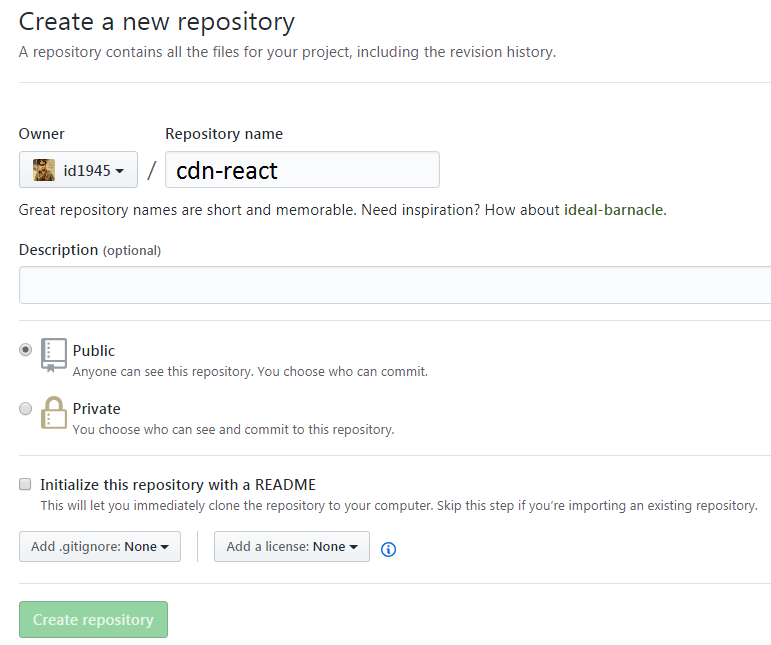
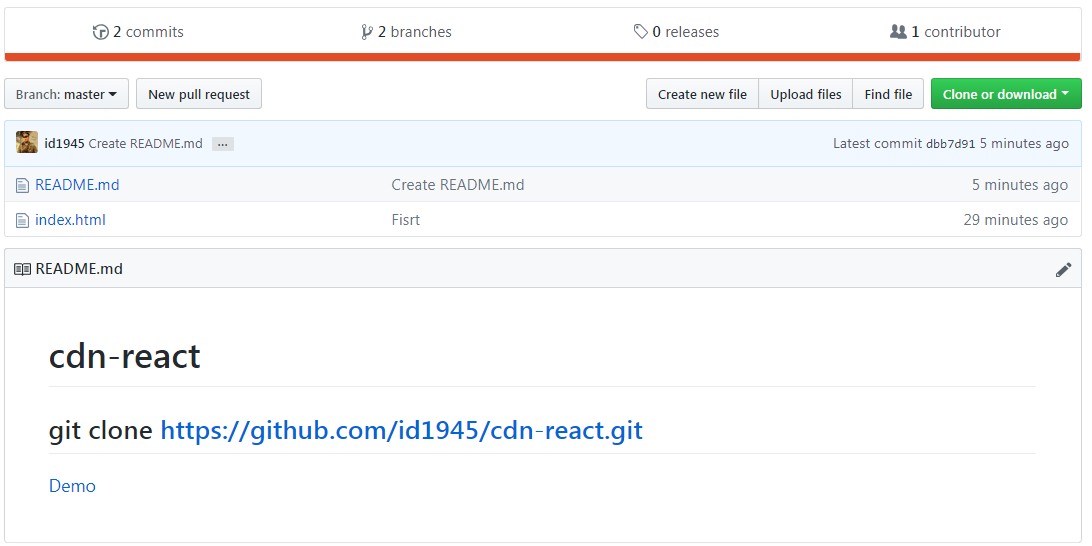
Deploy Simple Html on Github Pages

1# New repository

2# Commit Html code

3# Setting Pages master branch
#4 Checkout gh-pages branch
#5 Setting again page gh-pages branch
Success!
Check link demo

14 July 2017

Html: Tạo Scroll y trên Table và Tự động điều chỉnh độ rộng width của thẻ th bằng với độ rộng của thẻ td nội dung bên dưới bằng Javascript


Tự động điều chỉnh độ rộng của thẻ th dựa vào dòng nội dung dài nhất trong column đó
Scroll y Table điều chỉnh th bằng Javascript
Html 2017
<!DOCTYPE html>
<html>
<head>
<style>
table.scroll {
    border-spacing: 0;
    border: 2px solid black;
}

table.scroll tbody,
table.scroll thead { display: block; }

thead tr th { 
    height: 30px;
    line-height: 30px;
}

table.scroll tbody {
    height: 100px;
    overflow-y: auto;
    overflow-x: hidden;
}

tbody { border-top: 2px solid black; }

tbody td, thead th {
    border-right: 1px solid black;
    /* white-space: nowrap; */ Tự động dàn văn bản k xuống dòng
}

tbody td:last-child, thead th:last-child {
    border-right: none;
}
</style>

</head>
<body>

  <table class="scroll">
    <thead>
        <tr>
            <th>Head 1</th>
            <th>Head 2</th>
            <th>Head 3</th>
            <th>Head 4</th>
            <th>Head 5</th>
        </tr>
    </thead>
    <tbody>
        <tr>
            <td>Lorem ipsum</td>
            <td>Content 2</td>
            <td>Content 3</td>
            <td>Content 4</td>
            <td>Content 5</td>
        </tr>
        <tr>
            <td>Content 1</td>
            <td>Lorem ipsum dolor sit</td>
            <td>Content 3</td>
            <td>Content 4</td>
            <td>Content 5</td>
        </tr>
        <tr>
            <td>Content 1</td>
            <td>Content 2</td>
            <td>Content 3</td>
            <td>Content 4</td>
            <td>Lorem ipsum dolor sit amet</td>
        </tr>
        <tr>
            <td>Content 1</td>
            <td>Content 2</td>
            <td>Content 3</td>
   <td>Content 4</td>
            <td>Content 5</td>
        </tr>
        <tr>
            <td>Content 1</td>
            <td>Content 2</td>
            <td>Content 3</td>
            <td>Content 4</td>
            <td>Content 5</td>
        </tr>
        <tr>
            <td>Content 1</td>
            <td>Content 2</td>
            <td>Content 3</td>
            <td>Content 4</td>
            <td>Content 5</td>
        </tr>
        <tr>
            <td>Content 1</td>
            <td>Content 2</td>
            <td>Content 3</td>
            <td>Content 4</td>
            <td>Content 5</td>
        </tr>
    </tbody>
</table>
<script src="https://ajax.googleapis.com/ajax/libs/jquery/3.2.1/jquery.min.js"></script>
<script>
var table = $('table.scroll'), bodyCells = table.find('tbody tr:first').children(),colWidth;

$(window).resize(function() {
    colWidth = bodyCells.map(function() {
        return $(this).width();
    }).get();
    
    table.find('thead tr').children().each(function(i, v) {
        //$(v).text() => Head 1 .. Head 2 .. etc
        //colWidth[i] => 150 ...
        //i => 1 ~ 5 
        //$(this).css("min-width", colWidth[i]);
        $(v).width(colWidth[i]);
    });    
}).resize();
</script>
</body>
</html>
Nguồn: https://codedump.io/share/9ozwCMzEuc68/1/html-table-with-100-width-with-vertical-scroll-inside-tbody
Run demo 'lưu ý phải kéo đường kẻ ngăn của tool'

07 April 2016

kí tự đặc biệt trong html

Các ký tự đặc biệt thường dùng trong lập trình HTML

Danh sách các kí tự đặc biệt dùng trong HTMLVới việc đã biết được cách dùng các thẻ trong HTML, việc tạo ra một trang văn bản giống như trong Word có thể được thực hiện. Tuy nhiên, đôi khi do công việc yêu cầu mà trong trang văn bản đó cócác kí tự đặc biệt như đô la $, cent ¢, euro €, yen ¥,.. không thể gõ theo kiểu bình thường trong lập trình HTML được.
Vì vậy, để các ký tự đặc biệt đó hiển thị ra cho người đọc, bắt buộc người lập trình phải gõ các mã của chúng:

VD:
Muốn hiện 100 $ -> gõ là: 100 &#36;
Muốn hiện 50 ¥ -> gõ: 50  &#165;


Danh sách kí tự đặc biệt hay dùng trong blogger, website :

Các kí tự này thường hay được sử dụng trong lập trình blogspot, đặc biệt trong phần nhận xét của blogspot nếu bạn muốn hiện một đoạn mã nào đó.

Ký tựTên ký tựMã HTML cần gõ
&nbsp;&#160;
<&lt;&#60;
>&gt;&#62;
&&amp;&#38;
"&quot;&#34;
'&apos;&#39;
©&copy;&#169;

Các bạn có thể sủ dụng Công cụ này để chuyển đổi code trước khí bình luận trên Blogger
Code Converter

Danh sách kí tự đơn vị tiền tệ, đời sống thông dụng:


Ký tựTên ký tựMã HTML cần gõ
¢&cent;&#162;
$&#36;
¢&pound;&#162;
¥&yen;&#165;
&euro;&#8364;
§&sect;&#167;
®&reg;&#174;
×&times;&#215;
÷&divide;&#247;

Bảng tổng hợp tất cả các kí tự đặc biệt:

Các bạn cũng có thể gõ bằng cách giữ phím Alt+mã ASCII bên dưới
Bộ mã ASCII chuẩn, HTML Entity names
Trình duyệt hỗ trợ: Tất cả.

Mã ASCIIMã HTMLMã HTMLChú thích
Hệ DecHệ HexSymboltheo sốtheo tên
32
33
34
35
36
37
38
39
40
41
42
43
44
45
46
47
20
21
22
23
24
25
26
27
28
29
2A
2B
2C
2D
2E
2F

!
"
#
$
%
&
'
(
)
*
+
,
-
.
/
&#32;
&#33;
&#34;
&#35;
&#36;
&#37;
&#38;
&#39;
&#40;
&#41;
&#42;
&#43;
&#44;
&#45;
&#46;
&#47;


&quot;


&amp;


khoảng cách
dấu chấm than
dấu nháy đôi
dấu thăng
kí hiệu đô la
phần trăm
dấu Và
dấu nháy đơn
mở tròn đơn
đóng tròn đơn
dấu sao
dấu cộng
dấu phẩy
dấu trừ - dấu nối
dấu chấm
dấu gạch chéo - dấu sổ
48
49
50
51
52
53
54
55
56
57
58
59
60
61
62
63
30
31
32
33
34
35
36
37
38
39
3A
3B
3C
3D
3E
3F
0
1
2
3
4
5
6
7
8
9
:
;
<
=
>
?
&#48;
&#49;
&#50;
&#51;
&#52;
&#53;
&#54;
&#55;
&#56;
&#57;
&#58;
&#59;
&#60;
&#61;
&#62;
&#63;


&lt;

&gt;
số không
số một
số hai
số ba
số bốn
số năm
số sáu
số bảy
số tám
số chín
dấu hai chấm
dấu chấm phẩy
dấu bé hơn
dấu bằng
dấu lớn hơn
dấu chấm hỏi
64
65
66
67
68
69
70
71
72
73
74
75
76
77
78
79
40
41
42
43
44
45
46
47
48
49
4A
4B
4C
4D
4E
4F
@
A
B
C
D
E
F
G
H
I
J
K
L
M
N
O
&#64;
&#65;
&#66;
&#67;
&#68;
&#69;
&#70;
&#71;
&#72;
&#73;
&#74;
&#75;
&#76;
&#77;
&#78;
&#79;


dấu a còng(a vòng)
kí tự A i hoa
B in hoa
C in hoa
D in hoa
E in hoa
F in hoa
G in hoa
H in hoa
I in hoa
J in hoa
K in hoa
L in hoa
M in hoa
N in hoa
O in hoa
80
81
82
83
84
85
86
87
88
89
90
91
92
93
94
95
50
51
52
53
54
55
56
57
58
59
5A
5B
5C
5D
5E
5F
P
Q
R
S
T
U
V
W
X
Y
Z
[
\
]
^
_
&#80;
&#81;
&#82;
&#83;
&#84;
&#85;
&#86;
&#87;
&#88;
&#89;
&#90;
&#91;
&#92;
&#93;
&#94;
&#95;


P in hoa
Q in hoa
R in hoa
S in hoa
T in hoa
U in hoa
V in hoa
W in hoa
X in hoa
Y in hoa
Z in hoa
dấu mở vuông
dấu gạch chéo xuống
dấu đóng vuông
dấu mũ - lũy thừa
dấu gạch dưới
96
97
98
99
100
101
102
103
104
105
106
107
108
109
110
111
60
61
62
63
64
65
66
67
68
69
6A
6B
6C
6D
6E
6F
`
a
b
c
d
e
f
g
h
i
j
k
l
m
n
o
&#96;
&#97;
&#98;
&#99;
&#100;
&#101;
&#102;
&#103;
&#104;
&#105;
&#106;
&#107;
&#108;
&#109;
&#110;
&#111;


dấu huyền


112
113
114
115
116
117
118
119
120
121
122
123
124
125
126
70
71
72
73
74
75
76
77
78
79
7A
7B
7C
7D
7E
p
q
r
s
t
u
v
w
x
y
z
{
|
}
~
&#112;
&#113;
&#114;
&#115;
&#116;
&#117;
&#118;
&#119;
&#120;
&#121;
&#122;
&#123;
&#124;
&#125;
&#126;


dấu mở ngoặc nhọn
dấu phân cách dọc
dấu đóng ngoặc nhọn
dấu xấp xỉ - dấu ngã
160
161
162
163
164
165
166
167
168
169
170
171
172
174
175
A0
A1
A2
A3
A4
A5
A6
A7
A8
A9
AA
AB
AC
AE
AF

 ¡
¢
£
¤
¥
¦
§
¨
©
ª
«
¬

 ®
¯
&#160;
&#161;
&#162;
&#163;
&#164;
&#165;
&#166;
&#167;
&#168;
&#169;
&#170;
&#171;
&#172;
&#174;
&#175;
&nbsp;
&iexcl;
&cent;
&pound;
&curren;
&yen;
&brvbar;
&sect;
&uml;
&copy;
&ordf;
&laquo;
&not;
&reg;
&macr;
khoảng trắng
dấu chấm than ngược
kí hiệu cent
kí hiệu pound
kí hiệu đồng tiền
kí hiệu yen
broken vertical bar
kí hiệu phần - chương
spacing diaeresis - umlaut
kí hiệu copyright
chỉ số a nhỏ
dấu bé hơn đôi
not sign
kí hiệu đăng kí bản quyền
spacing macron - overline
176
177
178
179
180
181
182
183
184
185
186
187
188
189
190
191
B0
B1
B2
B3
B4
B5
B6
B7
B8
B9
BA
BB
BC
BD
BE
BF
°
±
²
³
´
µ

·
¸
¹
º
»
¼
½
¾
¿
&#176;
&#177;
&#178;
&#179;
&#180;
&#181;
&#182;
&#183;
&#184;
&#185;
&#186;
&#187;
&#188;
&#189;
&#190;
&#191;
&deg;
&plusmn;
&sup2;
&sup3;
&acute;
&micro;
&para;
&middot;
&cedil;
&sup1;
&ordm;
&raquo;
&frac14;
&frac12;
&frac34;
&iquest;
dấu độ C
dấu cộng trừ
chỉ số 2
chỉ số 3
dấu sắc
kí hiệu micro
paragraph sign
dấu chấm giữa
spacing cedilla
superscript one

dấu lớn hơn đôi
kí hiệu một phần tư
kí hiệu một phần hai
kí hiệu ba phần tư
dấu hỏi ngược
192
193
194
195
196
197
198
199
200
201
202
203
204
205
206
207
C0
C1
C2
C3
C4
C5
C6
C7
C8
C9
CA
CB
CC
CD
CE
CF
À
Á
Â
Ã
Ä
Å
Æ
Ç
È
É
Ê
Ë
Ì
Í
Î
Ï
&#192;
&#193;
&#194;
&#195;
&#196;
&#197;
&#198;
&#199;
&#200;
&#201;
&#202;
&#203;
&#204;
&#205;
&#206;
&#207;
&Agrave;
&Aacute;
&Acirc;
&Atilde;
&Auml;
&Aring;
&AElig;
&Ccedil;
&Egrave;
&Eacute;
&Ecirc;
&Euml;
&Igrave;
&Iacute;
&Icirc;
&Iuml;
Mã Latin của các kí tự


208
209
210
211
212
213
214
215
216
217
218
219
220
221
222
223
D0
D1
D2
D3
D4
D5
D6
D7
D8
D9
DA
DB
DC
DD
DE
DF
Ð
Ñ
Ò
Ó
Ô
Õ
Ö
×
Ø
Ù
Ú
Û
Ü
Ý
Þ
ß
&#208;
&#209;
&#210;
&#211;
&#212;
&#213;
&#214;
&#215;
&#216;
&#217;
&#218;
&#219;
&#220;
&#221;
&#222;
&#223;
&ETH;
&Ntilde;
&Ograve;
&Oacute;
&Ocirc;
&Otilde;
&Ouml;
&times;
&Oslash;
&Ugrave;
&Uacute;
&Ucirc;
&Uuml;
&Yacute;
&THORN;
&szlig;


224
225
226
227
228
229
230
231
232
233
234
235
236
237
238
239
E0
E1
E2
E3
E4
E5
E6
E7
E8
E9
EA
EB
EC
ED
EE
EF
à
á
â
ã
ä
å
æ
ç
è
é
ê
ë
ì
í
î
ï
&#224;
&#225;
&#226;
&#227;
&#228;
&#229;
&#230;
&#231;
&#232;
&#233;
&#234;
&#235;
&#236;
&#237;
&#238;
&#239;
&agrave;
&aacute;
&acirc;
&atilde;
&auml;
&aring;
&aelig;
&ccedil;
&egrave;
&eacute;
&ecirc;
&euml;
&igrave;
&iacute;
&icirc;
&iuml;


240
241
242
243
244
245
246
247
248
249
250
251
252
253
254
255
F0
F1
F2
F3
F4
F5
F6
F7
F8
F9
FA
FB
FC
FD
FE
FF
ð
ñ
ò
ó
ô
õ
ö
÷
ø
ù
ú
û
ü
ý
þ
ÿ
&#240;
&#241;
&#242;
&#243;
&#244;
&#245;
&#246;
&#247;
&#248;
&#249;
&#250;
&#251;
&#252;
&#253;
&#254;
&#255;
&eth;
&ntilde;
&ograve;
&oacute;
&ocirc;
&otilde;
&ouml;
&divide;
&oslash;
&ugrave;
&uacute;
&ucirc;
&uuml;
&yacute;
&thorn;
&yuml;


dấu chia


338
339
352
353
376
402
152
153
160
161
178
192
Œ
œ
Š
š
Ÿ
ƒ
&#338;
&#339;
&#352;
&#353;
&#376;
&#402;


8211
8212
8216
8217
8218
8220
8221
8222
8224
8225
8226
8230
8240
8364
8482
2013
2014
2018
2019
201A
201C
201D
201E
2020
2021
2022
2026
2030
20AC
2122


&#8211;
&#8212;
&#8216;
&#8217;
&#8218;
&#8220;
&#8221;
&#8222;
&#8224;
&#8225;
&#8226;
&#8230;
&#8240;
&#8364;
&#8482;


&euro;


dao găm
dao đôi


dấu phần nghìn
kí hiệu euro
kí hiệu thương hiệu


BACK TO TOP

Xuống cuối trang