• Thế Giới Giải Mã

    Bí ẩn nhân loại Leonardo Da Vinci

  • Thế Giới Giải Mã

    Anh hùng thầm lặng Nikola Tesla

  • Thế Giới Giải Mã

    Thần đèn Thomas Edison

  • Thế Giới Giải Mã

    Người thôi miên Adolf Hitler

Showing posts with label Android. Show all posts

27 January 2017

Android: Làm việc với Database SQLite Update Delete P2


Update Delete với Database SQLite

 
DBHelper.java
Java Android 2017
package com.example.lonely.demo.database;

import android.content.ContentValues;
import android.content.Context;
import android.database.Cursor;
import android.database.sqlite.SQLiteDatabase;
import android.database.sqlite.SQLiteOpenHelper;

/**
 * Created by anhtran on 1/18/17.
 */

public class DBHelper extends SQLiteOpenHelper{

    public static String DB_NAME = "user";
    public static int DB_VERSION = 2;

    public static String TABLE_USER = "TBL_USER";
    public static String ID = "_id";
    public static String NAME = "name";
    public static String GENDER = "gender";
    public static String DES = "des";


    public DBHelper(Context context) {
        super(context, DB_NAME, null, DB_VERSION);
    }

    @Override
    public void onCreate(SQLiteDatabase db) {

        //CREATE TABLE TBL_USER (
        //_id INTEGER PRIMARY KEY,
        // name TEXT,
        // gender TEXT,
        // des TEXT )

        String sql = "CREATE TABLE "+TABLE_USER + "(" +
                ID + " INTEGER " + "PRIMARY KEY AUTOINCREMENT, " +
                NAME + " TEXT, " +
                GENDER + " TEXT, " +
                DES + " TEXT )";
        db.execSQL(sql);

    }

    @Override
    public void onUpgrade(SQLiteDatabase db, int oldVersion, int newVersion) {

    }

    public String saveUser(String userName, String gender, String des) {
        SQLiteDatabase db = this.getWritableDatabase();
        ContentValues contentValues = new ContentValues();
        contentValues.put(NAME,userName);
        contentValues.put(GENDER,gender);
        contentValues.put(DES,des);

        long isInsert = db.insert(TABLE_USER,null,contentValues);
        if (isInsert == -1) {
            return "Insert Fail";
        }else return "Insert Success";
    }

    public Cursor getUser() {
        SQLiteDatabase db = this.getReadableDatabase();
        String sql = "SELECT * FROM " + TABLE_USER;
        Cursor cursor = db.rawQuery(sql,null);
        return cursor;
    }

    public String updateUser(int _id, String uName, String gender, String des) {
        SQLiteDatabase db = this.getWritableDatabase();
        ContentValues contentValues = new ContentValues();
        contentValues.put(NAME,uName);
        contentValues.put(GENDER,gender);
        contentValues.put(DES,des);
        int isUpdate = db.update(TABLE_USER,contentValues, ID + " = ?",new String[]{_id+""});
        if (isUpdate > 0) {
            return "Update Success";
        }
        return "Update Fail";
    }

    public String deleteUser(int _id) {
        SQLiteDatabase db = this.getWritableDatabase();
        int isDelete = db.delete(TABLE_USER, ID + " = ?", new String[]{_id+""});
        if (isDelete > 0) {
            return "Delete Sucess";
        }
        return "Delete fail";
    }
}
ListUserAct.java
Java Android 2017
package com.example.lonely.demo.activity;

import android.content.Intent;
import android.database.Cursor;
import android.os.Bundle;
import android.support.v7.app.AppCompatActivity;
import android.view.View;
import android.widget.AdapterView;
import android.widget.ListView;
import android.widget.SimpleCursorAdapter;

import com.example.lonely.demo.R;
import com.example.lonely.demo.database.DBHelper;


public class ListUserAct extends AppCompatActivity {

    private DBHelper db;
    private Cursor cursor;
    private SimpleCursorAdapter adapter;

    @Override
    protected void onCreate(Bundle savedInstanceState) {
        super.onCreate(savedInstanceState);
        setContentView(R.layout.activity_list_user);
        db = new DBHelper(this);

        //B1: Datasource
        cursor = db.getUser();
        //B2: Adapter
        adapter = new SimpleCursorAdapter(
                this,R.layout.item_user,cursor,
                new String[]{DBHelper.ID,DBHelper.NAME,DBHelper.GENDER},
                new int[]{R.id.tvID,R.id.tvUserName,R.id.tvGender},
                SimpleCursorAdapter.FLAG_REGISTER_CONTENT_OBSERVER);
        //B3: Listview
        ListView lvUser = (ListView) findViewById(R.id.lvUser);
        lvUser.setAdapter(adapter);

        lvUser.setOnItemClickListener(new AdapterView.OnItemClickListener() {
            @Override
            public void onItemClick(AdapterView<?> parent, View view, int position, long id) {

                Cursor c = (Cursor) adapter.getItem(position);
                String name = c.getString(c.getColumnIndex(DBHelper.NAME));
                String gender = c.getString(c.getColumnIndex(DBHelper.GENDER));
                String des = c.getString(c.getColumnIndex(DBHelper.DES));
                int _id = c.getInt(c.getColumnIndex(DBHelper.ID));

                Intent intent = new Intent(ListUserAct.this, UpdateAct.class);
                intent.putExtra(DBHelper.ID,_id);
                intent.putExtra(DBHelper.NAME,name);
                intent.putExtra(DBHelper.GENDER,gender);
                intent.putExtra(DBHelper.DES,des);

                startActivity(intent);

            }
        });
    }

    @Override
    protected void onStart() {
        super.onStart();
        cursor = db.getUser();
        adapter.changeCursor(cursor);
        adapter.notifyDataSetChanged();
    }
} 
UpdateAct.java
Java Android 2017
package com.example.lonely.demo.activity;

import android.content.Intent;
import android.os.Bundle;
import android.support.v7.app.AppCompatActivity;
import android.view.View;
import android.widget.Button;
import android.widget.EditText;

import com.example.lonely.demo.R;
import com.example.lonely.demo.database.DBHelper;

public class UpdateAct extends AppCompatActivity implements View.OnClickListener {

    private EditText eduser;
    private EditText edGender;
    private EditText edDes;
    private Button btUpdate;
    private Button btDelete;
    private DBHelper db;
    private int _id;

    @Override
    protected void onCreate(Bundle savedInstanceState) {
        super.onCreate(savedInstanceState);
        setContentView(R.layout.activity_update);

        db = new DBHelper(this);

        initView();

        Intent intent = getIntent();
        String name = intent.getStringExtra(DBHelper.NAME);
        String gender = intent.getStringExtra(DBHelper.GENDER);
        String des = intent.getStringExtra(DBHelper.DES);
        _id = intent.getIntExtra(DBHelper.ID,0);


        eduser.setText(name);
        edGender.setText(gender);
        edDes.setText(des);

    }

    private void initView() {
        eduser = (EditText) findViewById(R.id.edName);
        edGender = (EditText) findViewById(R.id.edGender);
        edDes = (EditText) findViewById(R.id.edDes);
        btUpdate = (Button) findViewById(R.id.btUpdate);
        btDelete = (Button) findViewById(R.id.btDelete);
        btUpdate.setOnClickListener(this);
        btDelete.setOnClickListener(this);
    }

    @Override
    public void onClick(View v) {
        if (v == btDelete) {
            db.deleteUser(_id);
        }
        if (v == btUpdate) {
            db.updateUser(_id,eduser.getText().toString(),edGender.getText().toString(),edDes.getText().toString());
        }

        finish();
    }
}
activity_update.xml
Java Android 2017
<?xml version="1.0" encoding="utf-8"?>
<LinearLayout xmlns:android="http://schemas.android.com/apk/res/android"
    xmlns:tools="http://schemas.android.com/tools"
    android:id="@+id/activity_update"
    android:layout_width="match_parent"
    android:layout_height="match_parent"
    android:orientation="vertical"
    tools:context="com.example.lonely.demo.activity.UpdateAct">

    <EditText
        android:layout_width="match_parent"
        android:layout_height="wrap_content"
        android:hint="Username"
        android:id="@+id/edName"/>

    <EditText
        android:layout_width="match_parent"
        android:layout_height="wrap_content"
        android:hint="Gender"
        android:id="@+id/edGender"/>

    <EditText
        android:layout_width="match_parent"
        android:layout_height="wrap_content"
        android:hint="Description"
        android:id="@+id/edDes"/>

    <Button
        android:layout_width="wrap_content"
        android:layout_height="wrap_content"
        android:id="@+id/btUpdate"
        android:layout_gravity="center"
        android:text="Update"/>

    <Button
        android:layout_width="wrap_content"
        android:layout_height="wrap_content"
        android:text="Delete"
        android:layout_gravity="center"
        android:id="@+id/btDelete"/>

</LinearLayout>

21 January 2017

Android: Test thực hành. INSERT + ListView + SQLite

DBHelper.java
Java Android 2017
package com.example.lonely.demo.database;

import android.content.ContentValues;
import android.content.Context;
import android.database.Cursor;
import android.database.sqlite.SQLiteDatabase;
import android.database.sqlite.SQLiteOpenHelper;

/**
 * Created by Lonely on 1/20/2017.
 */


public class DBHelper extends SQLiteOpenHelper {

    public static String DB_NAME = "product";
    public static int DB_VERSION = 1;

    public static String TABLE_USER = "tb_product";
    public static String ID = "_id"; //Chú ý: id có dấu để tránh gặp lỗi
    public static String NAME = "name";
    public static String QUANTITY = "_quantity"; //Chú ý quantity để dấu tránh gặp lỗi


    public DBHelper(Context context) {
        super(context, DB_NAME, null, DB_VERSION);
    }

    @Override
    public void onCreate(SQLiteDatabase db) {

        String sql = "CREATE TABLE " + TABLE_USER + "(" +
                ID + " INTEGER " + "PRIMARY KEY AUTOINCREMENT, " +
                NAME + " TEXT, " +
                QUANTITY + " INTEGER)";
        db.execSQL(sql);

    }

    @Override
    public void onUpgrade(SQLiteDatabase db, int oldVersion, int newVersion) {

    }

    public String saveProduct(String name, int quantity) {
        SQLiteDatabase db = this.getWritableDatabase();
        ContentValues contentValues = new ContentValues();
        contentValues.put(NAME, name);
        contentValues.put(QUANTITY, quantity);

        long isInsert = db.insert(TABLE_USER, null, contentValues);
        if (isInsert == -1) {
            return "Insert Fail";
        } else return "Insert Success";
    }

    public Cursor getProduct() {
        SQLiteDatabase db = this.getReadableDatabase();
        String sql = "SELECT * FROM " + TABLE_USER;
        Cursor cursor = db.rawQuery(sql, null);
        return cursor;
    }

}
item_product.xml
Java Android 2017
<?xml version="1.0" encoding="utf-8"?>
<RelativeLayout xmlns:android="http://schemas.android.com/apk/res/android"
    android:orientation="vertical"
    android:layout_width="match_parent"
    android:layout_height="match_parent">

    <TextView
        android:text="1"
        android:layout_width="50dp"
        android:layout_height="wrap_content"
        android:textSize="17sp"
        android:id="@+id/tv_id" />

    <TextView
        android:text="Product 1"
        android:textSize="17sp"
        android:layout_toRightOf="@id/tv_id"
        android:layout_width="250dp"
        android:layout_height="wrap_content"
        android:id="@+id/tv_name" />

    <TextView
        android:text="5"
        android:textSize="17sp"
        android:layout_toRightOf="@id/tv_name"
        android:layout_width="100dp"
        android:layout_height="wrap_content"
        android:id="@+id/tv_quantity" />
</RelativeLayout>
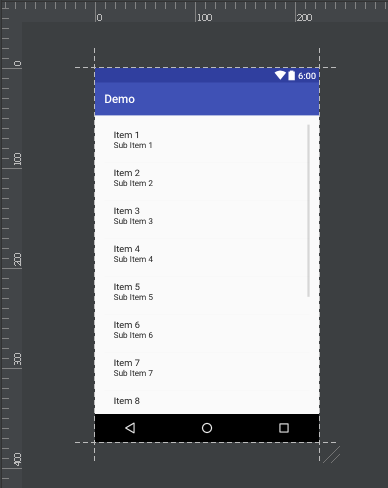
list_product.xml
Java Android 2017
<?xml version="1.0" encoding="utf-8"?>
<LinearLayout xmlns:android="http://schemas.android.com/apk/res/android"
    android:orientation="vertical" android:layout_width="match_parent"
    android:layout_height="match_parent">

    <ListView
        android:layout_width="match_parent"
        android:layout_height="match_parent"
        android:id="@+id/lv_product" />
</LinearLayout>
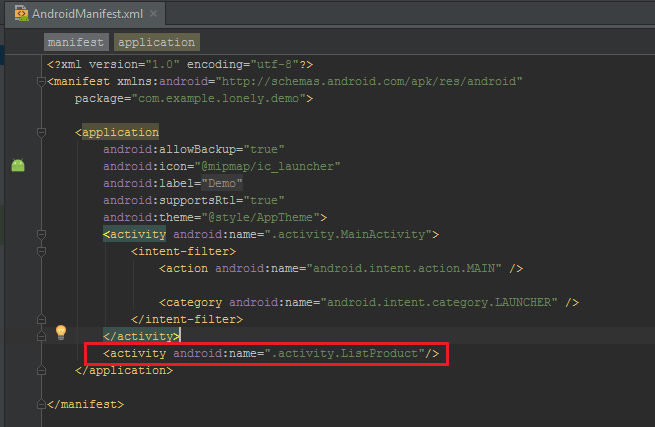
ListProduct
Java Android 2017
package com.example.lonely.demo.activity;

import android.database.Cursor;
import android.os.Bundle;
import android.support.v7.app.AppCompatActivity;
import android.widget.ListView;
import android.widget.SimpleCursorAdapter;

import com.example.lonely.demo.R;
import com.example.lonely.demo.database.DBHelper;

/**
 * Created by Lonely on 1/20/2017.
 */

public class ListProduct extends AppCompatActivity {
    private DBHelper db;
    private Cursor cursor;
    private SimpleCursorAdapter adapter;

    @Override
    protected void onCreate(Bundle savedInstanceState) {
        super.onCreate(savedInstanceState);
        setContentView(R.layout.list_product);

        db = new DBHelper(this);

        //B1: Datasource
        cursor = db.getProduct();
//B2: Adapter adapter = new SimpleCursorAdapter( this,R.layout.item_product,cursor, new String[]{DBHelper.ID,DBHelper.NAME,DBHelper.QUANTITY}, new int[]{R.id.tv_id,R.id.tv_name,R.id.tv_quantity}, SimpleCursorAdapter.FLAG_REGISTER_CONTENT_OBSERVER); //B3: Listview ListView lvUser = (ListView) findViewById(R.id.lv_product); lvUser.setAdapter(adapter); } }
product_activity.xml
Java Android 2017
<?xml version="1.0" encoding="utf-8"?>
<RelativeLayout xmlns:android="http://schemas.android.com/apk/res/android"
    xmlns:tools="http://schemas.android.com/tools"
    android:id="@+id/activity_main"
    android:layout_width="match_parent"
    android:layout_height="match_parent"
    android:paddingBottom="@dimen/activity_vertical_margin"
    android:paddingLeft="@dimen/activity_horizontal_margin"
    android:paddingRight="@dimen/activity_horizontal_margin"
    android:paddingTop="@dimen/activity_vertical_margin"
    tools:context="com.example.lonely.demo.activity.MainActivity">

    <EditText
        android:layout_width="wrap_content"
        android:layout_height="wrap_content"
        android:inputType="textPersonName"
        android:ems="12"
        android:id="@+id/edt_name"
        android:layout_alignParentTop="true"
        android:layout_alignParentRight="true"
        android:layout_alignParentEnd="true" />

    <TextView
        android:text="Name"
        android:layout_width="wrap_content"
        android:layout_height="wrap_content"
        android:layout_alignBottom="@+id/edt_name"
        android:layout_alignParentLeft="true"
        android:layout_alignParentStart="true"
        android:layout_marginLeft="15dp"
        android:layout_marginStart="5dp"
        android:id="@+id/textView" />

    <TextView
        android:text="Quantity"
        android:layout_width="wrap_content"
        android:layout_height="wrap_content"
        android:layout_below="@+id/textView"
        android:layout_alignLeft="@+id/textView"
        android:layout_alignStart="@+id/textView"
        android:layout_marginTop="25dp"
        android:id="@+id/textView2" />

    <EditText
        android:layout_width="wrap_content"
        android:layout_height="wrap_content"
        android:inputType="textPersonName"
        android:ems="12"
        android:layout_below="@+id/edt_name"
        android:layout_alignParentRight="true"
        android:layout_alignParentEnd="true"
        android:layout_marginTop="16dp"
        android:id="@+id/edt_quantity" />

    <Button
        android:text="ADD"
        android:layout_width="wrap_content"
        android:layout_height="wrap_content"
        android:layout_below="@+id/edt_quantity"
        android:layout_centerHorizontal="true"
        android:layout_marginTop="26dp"
        android:id="@+id/btn_add" />

    <Button
        android:text="VIEW"
        android:layout_width="wrap_content"
        android:layout_height="wrap_content"
        android:layout_below="@+id/btn_add"
        android:layout_alignLeft="@+id/btn_add"
        android:layout_alignStart="@+id/btn_add"
        android:layout_marginTop="29dp"
        android:id="@+id/btn_view" />
</RelativeLayout> 
MainActivity.java
Java Android 2017
package com.example.lonely.demo.activity;

import android.content.Intent;
import android.os.Bundle;
import android.support.v7.app.AppCompatActivity;
import android.view.View;
import android.widget.Button;
import android.widget.EditText;
import android.widget.Toast;

import com.example.lonely.demo.R;
import com.example.lonely.demo.database.DBHelper;

public class MainActivity extends AppCompatActivity implements View.OnClickListener {

    private DBHelper db;
    private EditText edName;
    private EditText edQuantity;
    private Button btnAdd;
    private Button btnView;

    @Override
    protected void onCreate(Bundle savedInstanceState) {
        super.onCreate(savedInstanceState);
        setContentView(R.layout.product_activity);

        db = new DBHelper(this);
        db.getReadableDatabase();

        initView();
    }

    private void initView() {
        edName = (EditText) findViewById(R.id.edt_name);
        edQuantity = (EditText) findViewById(R.id.edt_quantity);
        btnAdd = (Button) findViewById(R.id.btn_add);
        btnView = (Button) findViewById(R.id.btn_view);

        btnAdd.setOnClickListener(this);
        btnView.setOnClickListener(this);
    }
    private void onAdd() {
        if (edName.getText().toString().isEmpty()) {
            Toast.makeText(this,"Please enter product name", Toast.LENGTH_SHORT).show();
            return;
        }

        if (edQuantity.getText().toString().isEmpty()) {
            Toast.makeText(this,"Please enter product quantity", Toast.LENGTH_SHORT).show();
            return;
        }
        //Save data
        String mes = db.saveProduct(edName.getText().toString(), Integer.parseInt(edQuantity.getText().toString()));
        Toast.makeText(this, mes, Toast.LENGTH_SHORT).show();

        Intent intent = new Intent(MainActivity.this, ListProduct.class);
        startActivity(intent);
    }

    private void onView(){
        Intent intent = new Intent(MainActivity.this, ListProduct.class);
        startActivity(intent);
    }

    @Override
    public void onClick(View v) {
        switch (v.getId()){
            case R.id.btn_add:
                onAdd();
                break;
            case R.id.btn_view:
                onView();
                break;
            default:
                break;
        }
    }
}

Android: Test phần trắc nghiệm 15/17 câu


19 January 2017

Android: Register show ListView làm việc với Database SQLite INSERT vs SELECT P1

INSERT SELECT với Database SQLite
DBHelper.java
Java Android 2017
package com.example.lonely.demo.database;

import android.content.ContentValues;
import android.content.Context;
import android.database.Cursor;
import android.database.sqlite.SQLiteDatabase;
import android.database.sqlite.SQLiteOpenHelper;

/**
 * Created by anhtran on 1/18/17.
 */

public class DBHelper extends SQLiteOpenHelper{

    public static String DB_NAME = "user";
    public static int DB_VERSION = 2;

    public static String TABLE_USER = "TBL_USER";
    public static String ID = "_id"; //Chú ý: id có dấu để tránh gặp lỗi
    public static String NAME = "name";
    public static String GENDER = "gender";
    public static String DES = "des";


    public DBHelper(Context context) {
        super(context, DB_NAME, null, DB_VERSION);
    }

    @Override
    public void onCreate(SQLiteDatabase db) {

        String sql = "CREATE TABLE "+TABLE_USER + "(" +
                ID + " INTEGER " + "PRIMARY KEY AUTOINCREMENT, " +
                NAME + " TEXT, " +
                GENDER + " TEXT, " +
                DES + " TEXT )";
        db.execSQL(sql);

    }

    @Override
    public void onUpgrade(SQLiteDatabase db, int oldVersion, int newVersion) {

    }

    public String saveUser(String userName, String gender, String des) {
        SQLiteDatabase db = this.getWritableDatabase();
        ContentValues contentValues = new ContentValues();
        contentValues.put(NAME,userName);
        contentValues.put(GENDER,gender);
        contentValues.put(DES,des);

        long isInsert = db.insert(TABLE_USER,null,contentValues);
        if (isInsert == -1) {
            return "Insert Fail";
        }else return "Insert Success";
    }

    public Cursor getUser() {
        SQLiteDatabase db = this.getReadableDatabase();
        String sql = "SELECT * FROM " + TABLE_USER;
        Cursor cursor = db.rawQuery(sql,null);
        return cursor;
    }

}
item_user.xml
Java Android 2017
<?xml version="1.0" encoding="utf-8"?>
<LinearLayout xmlns:android="http://schemas.android.com/apk/res/android"
    android:layout_width="match_parent"
    android:layout_height="wrap_content"
    android:orientation="horizontal"
    android:layout_margin="10dp"
    android:weightSum="100">

    <TextView
        android:layout_width="0dp"
        android:layout_height="wrap_content"
        android:id="@+id/tvID"
        android:text="1"
        android:layout_weight="5"/>

    <TextView
        android:layout_width="0dp"
        android:layout_height="wrap_content"
        android:id="@+id/tvUserName"
        android:text="Obama"
        android:layout_weight="75"/>

    <TextView
        android:layout_width="0dp"
        android:layout_height="wrap_content"
        android:id="@+id/tvGender"
        android:text="Male"
        android:layout_weight="20"/>

</LinearLayout>
activity_list_user.xml
Java Android 2017
<?xml version="1.0" encoding="utf-8"?>
<RelativeLayout xmlns:android="http://schemas.android.com/apk/res/android"
    xmlns:tools="http://schemas.android.com/tools"
    android:id="@+id/activity_list_user"
    android:layout_width="match_parent"
    android:layout_height="match_parent"
    android:paddingBottom="@dimen/activity_vertical_margin"
    android:paddingLeft="@dimen/activity_horizontal_margin"
    android:paddingRight="@dimen/activity_horizontal_margin"
    android:paddingTop="@dimen/activity_vertical_margin"
    tools:context="com.example.lonely.demo.activity.ListUserAct">

    <ListView
        android:layout_width="match_parent"
        android:layout_height="match_parent"
        android:id="@+id/lvUser">
    </ListView>

</RelativeLayout>
ListUserAct.java
Java Android 2017
package com.example.lonely.demo.activity;

import android.database.Cursor;
import android.os.Bundle;
import android.support.v7.app.AppCompatActivity;
import android.widget.ListView;
import android.widget.SimpleCursorAdapter;

import com.example.lonely.demo.R;
import com.example.lonely.demo.database.DBHelper;

public class ListUserAct extends AppCompatActivity {

    private DBHelper db;
    private Cursor cursor;
    private SimpleCursorAdapter adapter;

    @Override
    protected void onCreate(Bundle savedInstanceState) {
        super.onCreate(savedInstanceState);
        setContentView(R.layout.activity_list_user);
        db = new DBHelper(this);

        //B1: Datasource
        cursor = db.getUser();
//B2: Adapter adapter = new SimpleCursorAdapter( this,R.layout.item_user,cursor, new String[]{DBHelper.ID,DBHelper.NAME,DBHelper.GENDER}, new int[]{R.id.tvID,R.id.tvUserName,R.id.tvGender}, SimpleCursorAdapter.FLAG_REGISTER_CONTENT_OBSERVER); //B3: Listview ListView lvUser = (ListView) findViewById(R.id.lvUser); lvUser.setAdapter(adapter); } }
activity_main.xml
Java Android 2017
<?xml version="1.0" encoding="utf-8"?>
<LinearLayout xmlns:android="http://schemas.android.com/apk/res/android"
    xmlns:tools="http://schemas.android.com/tools"
    android:id="@+id/activity_main"
    android:layout_width="match_parent"
    android:layout_height="match_parent"
    android:paddingBottom="@dimen/activity_vertical_margin"
    android:paddingLeft="@dimen/activity_horizontal_margin"
    android:paddingRight="@dimen/activity_horizontal_margin"
    android:paddingTop="@dimen/activity_vertical_margin"
    android:orientation="vertical"
    tools:context="com.example.lonely.demo.activity.MainActivity">

    <TextView
        android:layout_width="wrap_content"
        android:layout_height="wrap_content"
        android:text="Register"
        android:textColor="#da0a0a"
        android:textSize="30sp"
        android:layout_gravity="center"/>

    <EditText
        android:layout_width="match_parent"
        android:layout_height="wrap_content"
        android:hint="Username"
        android:id="@+id/edUser"/>

    <Spinner
        android:layout_width="match_parent"
        android:layout_height="wrap_content"
        android:id="@+id/spinner"
        android:layout_marginTop="10dp">

    </Spinner>

    <EditText
        android:layout_width="match_parent"
        android:layout_height="100dp"
        android:inputType="textMultiLine"
        android:hint="Description"
        android:layout_marginTop="10dp"
        android:gravity="top"
        android:id="@+id/edDes"/>

    <CheckBox
        android:layout_width="wrap_content"
        android:layout_height="wrap_content"
        android:id="@+id/ck"
        android:text="I have read and agree."/>

    <Button
        android:layout_width="wrap_content"
        android:layout_height="wrap_content"
        android:id="@+id/btRegister"
        android:text="Register"
        android:layout_gravity="center"
        android:layout_marginTop="10dp"/>
</LinearLayout>
MainActivity.java
Java Android 2017
package com.example.lonely.demo.activity;

import android.content.Intent;
import android.os.Bundle;
import android.support.v7.app.AppCompatActivity;
import android.view.View;
import android.widget.ArrayAdapter;
import android.widget.Button;
import android.widget.CheckBox;
import android.widget.EditText;
import android.widget.Spinner;
import android.widget.Toast;

import com.example.lonely.demo.R;
import com.example.lonely.demo.database.DBHelper;


public class MainActivity extends AppCompatActivity implements View.OnClickListener {

    private EditText edUser;
    private EditText edDes;
    private Spinner spinner;
    private CheckBox checkBox;
    private Button btRegister;
    private DBHelper db;

    @Override
    protected void onCreate(Bundle savedInstanceState) {
        super.onCreate(savedInstanceState);
        setContentView(R.layout.activity_main);

        db = new DBHelper(this);
        db.getReadableDatabase();

        initView();
    }

    private void initView() {
        edUser = (EditText) findViewById(R.id.edUser);
        edDes = (EditText) findViewById(R.id.edDes);
        spinner = (Spinner) findViewById(R.id.spinner);
        checkBox = (CheckBox) findViewById(R.id.ck);
        btRegister = (Button) findViewById(R.id.btRegister);

        btRegister.setOnClickListener(this);

        String[] genders = {"Male","Female","Unknow"};

        ArrayAdapter<String> adapter = new ArrayAdapter<String>(this,android.R.layout.simple_list_item_1,genders);
        spinner.setAdapter(adapter);
    }

    private void onRegister() {
        if (edUser.getText().toString().isEmpty()) {
            Toast.makeText(this,"Please enter username", Toast.LENGTH_SHORT).show();
            return;
        }

        if (!checkBox.isChecked()) {
            Toast.makeText(this,"Please agree rules", Toast.LENGTH_SHORT).show();
            return;
        }
        //Save data
        String mes = db.saveUser(edUser.getText().toString(), spinner.getSelectedItem().toString(), edDes.getText().toString());
        Toast.makeText(this, mes, Toast.LENGTH_SHORT).show();

        Intent intent = new Intent(MainActivity.this, ListUserAct.class);
        startActivity(intent);

    }

    @Override
    public void onClick(View v) {
        if (v == btRegister) {
            onRegister();
        }
    }

}

15 January 2017

Android: Sử dụng Retrofit Gson để hiển thị dữ liệu từ JSON và dùng Glide hiển thị Image (Android Studio)

Examp hiển thị title và image từ API JSON
Ở đây lý do sử dung Retrofit là vì  cấu trúc và cách hoạt động của nó nhẹ và nhanh vì vậy nó rất thích hợp với App Android
Đầu tiên chúng ta tao project và đến build.gradle (Module: app) thêm thư viện Retrofit, Gson, Glide rồi bấm Sync now để Android Studio tự động download thư viện về cho chúng ta.
compile 'com.squareup.retrofit2:retrofit:2.1.0'
compile 'com.squareup.retrofit2:converter-gson:2.1.0'
compile 'com.github.bumptech.glide:glide:3.7.0'
Tiếp theo ở bài này ta tạo ứng dụng xem thời tiết. Vì vậy cần cấp quyềnINTERNET
<uses-permission android:name="android.permission.INTERNET" />
<uses-permission android:name="android.permission.ACCESS_NETWORK_STATE" />
Bước tiếp theo chúng ta sẽ làm các bước để lấy dữ liệu từ URI có dữ liệu là JSON dưới đây
http://tindohanghieu.net/wp-json/wp/v2/posts?categories=51&page=1&per_page=100
-Sử dụng tiện ích Chrome Boomerang - SOAP & REST Client để test và hiển thị dữ liệu JSON của URI đó
Chúng ta sẽ chỉ lấy: title , excerpt, better_featured_image để hiển thị dưới đây là JSON lọc từ URI ở trên.
[
    {
 
        "title": {
            "rendered": "Những mánh khoé lừa đảo của các đối tượng khi giao dịch online"
        },
     
        "excerpt": {
            "rendered": "<p>Khi giao dịch online phát triển, người bán người mua không phải gặp nhau trực tiếp mà chỉ cần một tài khoản mạng xã hội, tài khoản chuyển tiền là đã có thể mua bán với nhau. Sự lỏng lẻo và không có một ai đứng ra quản lý những giao dịch như vậy đã [&hellip;]</p>\n"
        },
        
        "better_featured_image": {
           
            "source_url": "http://tindohanghieu.net/wp-content/uploads/12-1.jpg"
        }
            
    }
]
Tiếp theo tạo package model  
Nhìn vào cấu trúc dữ liệu JSON phía trên thì chúng ta tạo lần lượt các class theo thứ tự:
Chú ý: Tạo class nhanh dự vào ToolSite http://pojo.sodhanalibrary.com/
Title.java
Java Android 2017
package com.example.lonely.myapplication.model;

/**
 * Created by Lonely on 1/15/2017.
 */

public class Title {
    private String rendered;

    public String getRendered() {
        return rendered;
    }

    public void setRendered(String rendered) {
        this.rendered = rendered;
    }

}
Excerpt.java
Java Android 2017
package com.example.lonely.myapplication.model;

/**
 * Created by Lonely on 1/15/2017.
 */

public class Excerpt {
    private String rendered;

    public String getRendered() {
        return rendered;
    }

    public void setRendered(String rendered) {
        this.rendered = rendered;
    }

}
Better_featured_image.java
Java Android 2017
package com.example.lonely.myapplication.model;

/**
 * Created by Lonely on 1/15/2017.
 */

public class Better_featured_image {
    private String source_url;

    public String getSource_url() {
        return source_url;
    }

    public void setSource_url(String source_url) {
        this.source_url = source_url;
    }

}
MyPojo.java
Java Android 2017
package com.example.lonely.myapplication.model;

/**
 * Created by Lonely on 1/15/2017.
 */

public class MyPojo {
    private Title title;
    private Excerpt excerpt;
    private Better_featured_image better_featured_image;

    public Title getTitle() {
        return title;
    }

    public void setTitle(Title title) {
        this.title = title;
    }

    public Excerpt getExcerpt() {
        return excerpt;
    }

    public void setExcerpt(Excerpt excerpt) {
        this.excerpt = excerpt;
    }

    public Better_featured_image getBetter_featured_image() {
        return better_featured_image;
    }

    public void setBetter_featured_image(Better_featured_image better_featured_image) {
        this.better_featured_image = better_featured_image;
    }

}
Tạo package network
APIManager.java
Java Android 2017
package com.example.lonely.myapplication.network;

import com.example.lonely.myapplication.model.MyPojo;

import java.util.List;

import retrofit2.Call;
import retrofit2.http.GET;

/**
 * Created by anhtran on 1/13/17.
 */

public interface APIManager {

    public static String BASE_URL = "http://tindohanghieu.net/";

    @GET("wp-json/wp/v2/posts?categories=51&page=1&per_page=100")
    Call<List<MyPojo>> apiGetNews();

}
Tạo Layout
activity_main.xml
Java Android 2017
<?xml version="1.0" encoding="utf-8"?>
<RelativeLayout xmlns:android="http://schemas.android.com/apk/res/android"
    xmlns:tools="http://schemas.android.com/tools"
    android:id="@+id/activity_main"
    android:layout_width="match_parent"
    android:layout_height="match_parent"
    android:paddingBottom="@dimen/activity_vertical_margin"
    android:paddingLeft="@dimen/activity_horizontal_margin"
    android:paddingRight="@dimen/activity_horizontal_margin"
    android:paddingTop="@dimen/activity_vertical_margin"
    tools:context="com.example.lonely.myapplication.activity.MainActivity">

    <TextView
        android:id="@+id/tvTitle"
        android:layout_width="wrap_content"
        android:layout_height="wrap_content"
        android:text="Hello World!" />

    <TextView
        android:id="@+id/tvDescription"
        android:layout_width="wrap_content"
        android:layout_height="wrap_content"
        android:text="Hello World!"
        android:layout_below="@+id/tvTitle"
        android:layout_marginTop="20dp"/>

    <ImageView
        android:layout_width="match_parent"
        android:layout_height="match_parent"
        android:id="@+id/ivCover"
        android:layout_below="@+id/tvDescription"
        android:layout_marginTop="20dp"/>
</RelativeLayout>
Tạo package activity
MainActivity.java
Java Android 2017
package com.example.lonely.myapplication.activity;

import android.os.Bundle;
import android.support.v7.app.AppCompatActivity;
import android.text.Html;
import android.widget.ImageView;
import android.widget.TextView;
import android.widget.Toast;

import com.bumptech.glide.Glide;
import com.example.lonely.myapplication.R;
import com.example.lonely.myapplication.model.MyPojo;
import com.example.lonely.myapplication.network.APIManager;

import java.util.List;

import retrofit2.Call;
import retrofit2.Callback;
import retrofit2.Response;
import retrofit2.Retrofit;
import retrofit2.converter.gson.GsonConverterFactory;

public class MainActivity extends AppCompatActivity {
    private TextView tvTitle;
    private TextView tvDes;
    private ImageView ivCover;

    @Override
    protected void onCreate(Bundle savedInstanceState) {
        super.onCreate(savedInstanceState);
        setContentView(R.layout.activity_main);

        tvTitle = (TextView)findViewById(R.id.tvTitle);
        tvDes = (TextView)findViewById(R.id.tvDescription);
        ivCover = (ImageView) findViewById(R.id.ivCover);

        getData();

    }

    private void getData() {
        //Đoạn code này lấy từ https://square.github.io/retrofit/
        Retrofit retrofit = new Retrofit.Builder()
                .baseUrl(APIManager.BASE_URL)
                .addConverterFactory(GsonConverterFactory.create())
                .build();

        APIManager service = retrofit.create(APIManager.class);
        //====================================================//

        service.apiGetNews().enqueue(new Callback<List<MyPojo>>() {
            @Override
            public void onResponse(Call<List<MyPojo>> call, Response<List<MyPojo>> response) {

                // Get data from server
                List<MyPojo> list = response.body();

                // Show data in view
                MyPojo newsItem = list.get(0);
                tvTitle.setText(newsItem.getTitle().getRendered());
                tvDes.setText(Html.fromHtml(newsItem.getExcerpt().getRendered()));

                // Download image
                String linkImage = newsItem.getBetter_featured_image().getSource_url();
                Glide.with(MainActivity.this).load(linkImage).into(ivCover);

            }

            @Override
            public void onFailure(Call<List<MyPojo>> call, Throwable t) {
                Toast.makeText(MainActivity.this,"On Fail",Toast.LENGTH_SHORT).show();
            }
        });


    }
}


BACK TO TOP

Xuống cuối trang